
How to Generate Leads Using Facebook Ads (Complete 2026 Guide) 📱
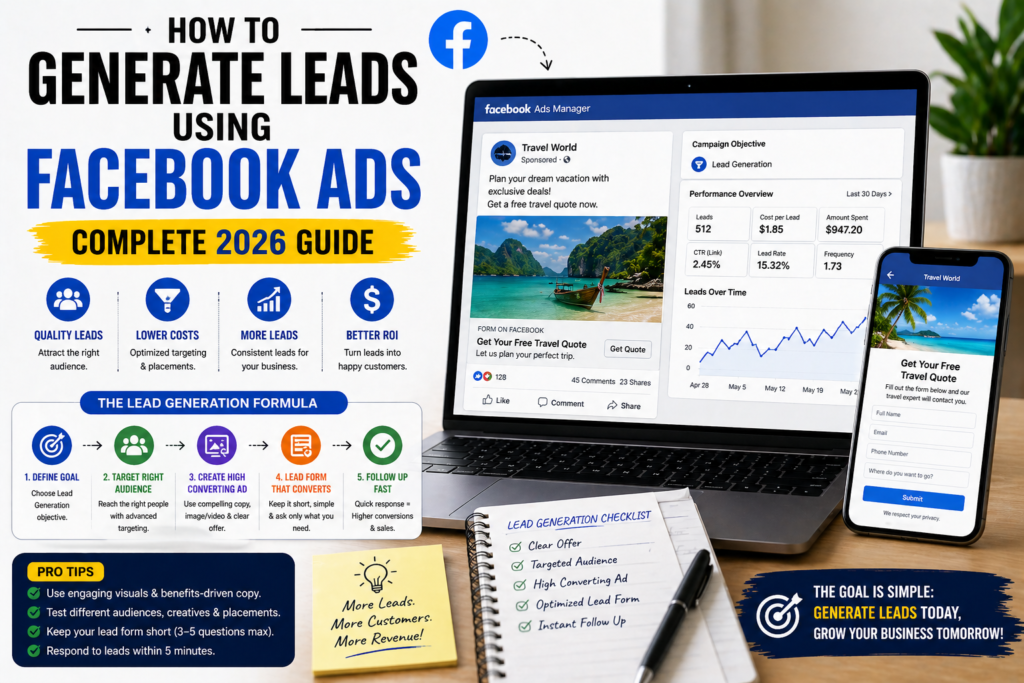
🎯 TL;DR To generate leads using Facebook Ads, use the Leads campaign objective with Facebook’s native Lead Generation forms — they convert 2–5x better than sending cold traffic to a website because the customer’s details are pre-filled from their Facebook profile. Combine this with interest-based or lookalike audience targeting, a specific free offer (free guide, free consultation), and an automated follow-up sequence triggered within 5 minutes of submission. Well-optimised Facebook lead generation campaigns typically generate leads at £3–£15 each depending on industry and offer.
💡 Summary Facebook Ads is one of the most cost-effective lead generation channels available to small businesses — when used correctly. The key is understanding that Facebook captures demand before people start searching, not at the point of search. This changes everything about how you structure your campaigns, what you offer, and how you follow up. This guide walks you through the complete Facebook Ads lead generation system — from your first campaign to scaling what works.
Facebook has over 3 billion monthly active users. Your ideal customers are on it right now — scrolling through their feed, watching videos, checking in on friends.
The question isn’t whether Facebook Ads can generate leads for your business. It’s whether you know how to use it correctly — because most businesses that try Facebook Ads for lead generation get it wrong and conclude it doesn’t work.
It works. The problem is almost always the approach, not the platform.
Generating leads using Facebook Ads requires a fundamentally different mindset from Google Ads. You’re not capturing people who are already searching — you’re interrupting people who weren’t thinking about you at all, with an offer compelling enough to make them stop, engage, and share their contact details.
This guide shows you exactly how to do that. 👇
Why Facebook Ads Works for Lead Generation
The short answer: Facebook Ads generates leads by reaching your ideal customer profile before they start searching — making it a demand creation channel that fills your pipeline with prospects who will become ready to buy weeks or months later.
The Fundamental Difference From Google Ads
Google Ads captures existing demand — people who are already searching for what you offer. Facebook Ads creates demand — it reaches people who match your ideal customer profile before they’ve started looking.
This means:
- Facebook leads are typically earlier in the buying journey
- They require more nurturing before they’re ready to convert
- The cost per lead is usually lower than Google Ads
- The quality of leads depends heavily on your targeting and offer
Neither channel is better — they’re complementary. Google Ads for immediate, high-intent leads. Facebook Ads for building a larger pipeline of prospects at lower cost.
The Targeting Advantage
Facebook’s targeting capabilities are unmatched. You can reach people based on:
- Age, location, income level
- Interests, pages they follow, groups they’re in
- Life events (recently engaged, new homeowner, new parent)
- Behaviours (frequent travellers, online shoppers, small business owners)
- Lookalike audiences based on your existing customers
This precision means your ads reach people who are genuinely likely to be interested — not just anyone with a Facebook account.
Step 1 — Set Up Your Facebook Ads Infrastructure
The short answer: Before running a single lead generation ad, you need three things: a Facebook Business Page, a Meta Business Manager account, and the Meta Pixel installed on your website — without these foundations, you can’t track leads, build audiences, or optimise campaigns properly.
Facebook Business Page
Your Business Page is the public face of your business on Facebook. Every ad you run comes from your Page.
If you don’t have one:
- Go to facebook.com/pages/create
- Select “Business or Brand”
- Add your business name, category, profile photo (logo), and cover photo
- Complete the About section with your description, website, phone number, and hours
A complete, professional-looking Page builds credibility — when someone clicks on your ad and checks your Page, what they see affects whether they trust you enough to submit their details.
Meta Business Manager
Business Manager (business.facebook.com) is the central hub for managing your Page, ad account, and the Meta Pixel. Always run ads from Business Manager — not from your personal account.
- Go to business.facebook.com
- Click “Create Account”
- Add your Business Page
- Create an Ad Account
- Add your payment method
The Meta Pixel
The Meta Pixel is a small piece of code installed on your website that tracks visitor behaviour and links it back to your Facebook Ads. It’s essential for:
- Conversion tracking — knowing which ads generate leads
- Remarketing — showing ads to people who’ve visited your website
- Lookalike audiences — finding new people similar to your existing leads and customers
How to install the Pixel:
- In Business Manager go to Events Manager → Pixels → Add
- Name your pixel and enter your website URL
- Choose “Use a Partner Integration” — if your website uses WordPress, select WordPress
- Install the Meta Pixel for WordPress plugin and connect it with your Pixel ID
- Verify installation using the Meta Pixel Helper Chrome extension
Install the Pixel before your first campaign. Every week you run ads without it is a week of audience data you can never recover.
Step 2 — Choose the Right Campaign Objective for Lead Generation
The short answer: For lead generation, always use the “Leads” campaign objective — it tells Facebook’s algorithm to find people most likely to submit a form, and unlocks the native Lead Generation ad format which converts significantly better than traffic campaigns.
Why “Leads” Beats “Traffic” for Lead Generation
Many businesses make the mistake of using the “Traffic” objective for lead generation campaigns. Traffic optimises for clicks — it finds people most likely to click your ad and visit your website. But clicking and submitting a form are very different actions.
The “Leads” objective optimises specifically for form submissions — it finds people in your target audience who have historically been likely to submit lead forms. The algorithm is better at its job when you tell it exactly what you want.
For lead generation always use: Campaigns → Leads objective ✅
The Two Lead Generation Methods
Within the Leads objective, you have two options:
Option 1 — Instant Forms (Native Lead Forms) A form opens inside Facebook/Instagram when someone taps your ad. The customer’s name, email, and phone number are automatically pre-filled from their profile. They review and submit — without ever leaving the app.
Why this works: Zero friction. No website to load, no new page to navigate. The pre-filled details mean submission takes 10 seconds. Conversion rates are typically 2–5x higher than website landing pages for cold audiences.
Best for: Most lead generation campaigns, especially for cold audiences.
Option 2 — Website (Landing Page) The ad sends people to a landing page on your website where they complete a form.
Why this works: More context and information before the ask. Better for warmer audiences who need more convincing. Allows full tracking via GA4.
Best for: Remarketing campaigns, warmer audiences, complex offers requiring explanation.
Recommendation: Start with Instant Forms for cold audiences. Use website landing pages for remarketing.
Step 3 — Build Your Target Audience
The short answer: The three most effective Facebook lead generation audiences are Lookalike Audiences based on your existing customers (highest quality), interest-based audiences targeting people with relevant demonstrated interests (most scalable), and website visitor remarketing audiences (highest conversion rate).
Audience Type 1 — Lookalike Audiences (Best Quality)
A Lookalike Audience finds new people who closely resemble your existing customers or leads. Facebook analyses hundreds of data points about your source audience and finds people with similar characteristics.
How to create one:
- Go to Audiences in Business Manager
- Click Create Audience → Lookalike Audience
- Source: upload your customer email list (minimum 100 emails, 1,000+ recommended)
- Location: your target country/region
- Audience size: start with 1% (most similar) and test up to 3%
If you don’t have a customer list yet: Create a Lookalike from your website visitors (requires Pixel data) or from people who’ve engaged with your Facebook Page.
Audience Type 2 — Interest-Based Targeting (Most Scalable)
Target people based on their interests, behaviours, and demographics.
Effective interest targeting for different business types:
Travel agencies:
- Luxury travel, adventure travel, honeymoon planning
- Followers of travel publications (Condé Nast Traveller, Lonely Planet)
- Frequent international travellers (Facebook behaviour)
- Recently engaged (life event targeting)
Small businesses / general:
- Small business owners, entrepreneurs, self-employed
- Relevant industry interests
- Competitor page followers (if available)
- Income targeting (where available in your region)
Tips for interest targeting:
- Create separate ad sets for different interest groups — don’t stack everything into one
- Start with audiences of 500,000–2,000,000 for most markets (large enough to give Facebook room to optimise, small enough to stay relevant)
- Test one interest cluster per ad set so you know what’s actually working
Audience Type 3 — Website Visitor Remarketing (Highest Conversion Rate)
Show ads specifically to people who’ve already visited your website. These people already know your brand — they convert at significantly higher rates than cold audiences.
Remarketing audiences to create:
- All website visitors — last 30 days
- Visitors to specific pages (e.g. your Maldives destination page) — last 60 days
- People who started but didn’t complete your enquiry form — last 14 days
- Past customers (uploaded email list)
Remarketing audiences are small but highly targeted. Even a small daily budget (£5–£10/day) can generate significant results from a well-built remarketing audience.
Step 4 — Create Your Lead Generation Offer
The short answer: The offer is the most important element of a Facebook lead generation campaign — cold audiences rarely submit contact details for nothing in return. The most effective offers are specific free resources (destination guides, checklists, consultation calls) that deliver genuine value and pre-qualify the lead simultaneously.
What Makes a Good Lead Generation Offer
Your offer needs to answer one question for the potential lead: “Why would I give this business my contact details right now?”
Effective lead generation offers:
Free resource offers (highest volume):
- “Get our free [Destination] Planning Guide”
- “Download the Ultimate [Trip Type] Checklist”
- “Get your free [Destination] Itinerary Template”
These attract people in the research phase — earlier in the buying journey but potentially high-value once nurtured.
Consultation offers (higher quality leads):
- “Get a free 20-minute consultation with a specialist”
- “Speak to an expert — free, no obligation”
- “Get a free personalised quote”
These attract people closer to a decision. Lower volume but higher quality.
Quiz / assessment offers (engaging and qualifying):
- “Find out which Maldives resort is right for you”
- “Take our 2-minute quiz to find your perfect holiday destination”
These are highly engaging and do double duty — they entertain and qualify simultaneously.
Matching Offer to Audience Temperature
| Audience | Best Offer Type |
|---|---|
| Cold (no prior contact) | Free resource — low commitment ask |
| Warm (website visitors, engagers) | Free consultation or personalised quote |
| Hot (past enquirers, remarketing) | Direct offer — “Book your free consultation now” |
Step 5 — Create Your Lead Generation Ad
The short answer: Facebook lead generation ads that convert well lead with an emotionally resonant image or video, open with a hook that speaks directly to the target audience’s desire or problem, communicate the specific offer clearly, and end with a single specific CTA.
The Ad Creative Formula
Visual (image or video): Lead with visual content that immediately communicates relevance and desire. For travel: destination photography. For business services: a credible-looking professional setting or results-focused graphic.
Video consistently outperforms static images for cold audiences — even a 15–30 second smartphone video can significantly outperform a polished static ad. Authenticity beats production value on Facebook.
Ad copy structure:
Line 1 — The Hook Stop the scroll with a line that speaks directly to your target audience’s desire, problem, or curiosity.
“Planning a Maldives honeymoon and not sure where to start? 🌊” “Most small businesses waste 60% of their Facebook Ads budget on the wrong audiences.” “We’ve visited 40 Maldives resorts so you don’t have to.”
Lines 2–4 — The Value Expand on the hook. What problem do you solve? What will they get? Why should they trust you?
“After planning 1,200+ Maldives honeymoons, we’ve created a free guide covering everything you need to know — which atolls are best, which resorts are worth the premium, and what to avoid.”
Line 5 — The CTA One specific, low-friction call to action.
“Click below to download your free Maldives Honeymoon Planning Guide 👇”
Headline and Description (in the ad card)
Headline (25 chars): Short and benefit-focused “Free Maldives Guide 🌴”
Description: Reinforce the offer “Everything you need to plan the perfect Maldives honeymoon — free download”
Lead Form Setup
When using Instant Forms:
- Form type: Select “Higher Intent” — adds a review step before submission, reduces volume but dramatically improves lead quality
- Intro screen: Brief, compelling — reiterate the offer in 1–2 sentences
- Questions: Keep to minimum — name, email, phone (optional), and one qualifying question maximum
- Privacy policy: Required — link to your privacy policy page
- Thank you screen: Confirm what happens next — “We’ll send your guide within 5 minutes. Our team will also be in touch within 24 hours.”
Step 6 — Set Your Budget and Bidding
The short answer: Start with a minimum of £10–£15 per day per ad set for Facebook lead generation — below this, Facebook’s algorithm doesn’t have enough data to exit the learning phase efficiently. Scale budgets by no more than 20–30% at a time to avoid resetting the learning phase.
The Learning Phase
Every new ad set enters a learning phase where Facebook experiments to find the best people to show your ad to. During this phase — typically the first 50 lead events — performance will be inconsistent.
To exit the learning phase faster:
- Ensure your budget allows for at least 50 lead events within 7 days
- Don’t make significant changes during learning (new creative, audience changes, large budget shifts)
- Consolidate ad sets where possible — fewer ad sets with higher budgets learn faster than many ad sets with tiny budgets
Starting Budget Recommendations
| Campaign Type | Minimum Daily Budget |
|---|---|
| Cold audience prospecting | £15–£30/day per ad set |
| Remarketing | £5–£10/day per ad set |
| Lookalike audience | £15–£25/day per ad set |
Bidding Strategy
For most lead generation campaigns, use “Lowest Cost” bidding (Facebook’s default) to start. This lets Facebook optimise freely and gives you a baseline cost per lead.
Once you have consistent data (100+ leads), test “Cost Per Result Goal” bidding to set a target cost per lead.
Step 7 — Follow Up Fast — The Most Important Step
The short answer: Speed of follow-up is the single biggest determinant of Facebook lead conversion rate — leads contacted within 5 minutes convert at 9x the rate of leads contacted after 30 minutes. Every Facebook lead generation campaign needs an automated follow-up sequence triggered immediately on submission.
Why Follow-Up Speed Matters So Much
Facebook leads are cold — the person wasn’t actively searching for you when they saw your ad. Their interest was triggered in the moment. If you don’t follow up within minutes, that interest fades rapidly.
Research consistently shows:
- Leads contacted within 5 minutes: highest conversion rate
- Leads contacted within 1 hour: 7x lower conversion rate than 5-minute response
- Leads contacted after 24 hours: minimal chance of conversion
The Automated Follow-Up System
Step 1 — Instant delivery (0–2 minutes) Use Zapier (free tier) to connect your Facebook Lead Form to your email marketing platform (Mailchimp, ActiveCampaign). The moment someone submits, they automatically receive:
- The promised resource (guide, checklist, etc.)
- A warm welcome email
Step 2 — Email nurture sequence Every lead enters an automated email sequence:
- Email 1 (immediate): Deliver the resource + warm welcome
- Email 2 (Day 3): Genuine value — insight related to their interest
- Email 3 (Day 7): Social proof — customer story
- Email 4 (Day 14): Soft invitation to take the next step
- Email 5 (Day 21): Direct CTA
Step 3 — Personal follow-up for high-quality leads For leads who’ve shown higher intent signals (opened multiple emails, clicked through to your website), a personal follow-up call or WhatsApp message within 24–48 hours significantly increases conversion rates.
Measuring Your Facebook Lead Generation Performance
Track these metrics weekly to understand what’s working:
| Metric | What It Measures | Good Benchmark |
|---|---|---|
| Cost Per Lead (CPL) | What you pay per form submission | £3–£15 (varies by industry) |
| Lead Quality Rate | % of leads that are genuine prospects | 30–50% |
| Click-Through Rate (CTR) | % who click your ad | 1–3% for cold audiences |
| Lead Form Completion Rate | % who complete the form after opening it | 10–20% for Instant Forms |
| Cost Per Qualified Lead | Cost per lead that becomes a real prospect | Your key metric |
| Return on Ad Spend (ROAS) | Revenue generated per £1 spent | Track over 90 days |
The most important metric isn’t Cost Per Lead — it’s Cost Per Qualified Lead. A campaign generating £3 leads that are 90% irrelevant is worse than one generating £12 leads that are 60% qualified.
Common Facebook Lead Generation Mistakes ❌
1. Using the Traffic objective instead of Leads Traffic optimises for clicks. Leads optimises for form submissions. Always use the Leads objective for lead generation campaigns.
2. No follow-up system The most expensive mistake. Facebook leads go cold within hours. Automate follow-up before your first ad goes live.
3. Asking for too much information Every additional form field reduces completion rates. Name, email, and one qualifying question is enough for most campaigns.
4. Sending cold traffic to a website landing page Cold audiences convert much better on native Instant Forms than on website landing pages. Save website landing pages for warmer audiences.
5. Making too many changes too quickly Every significant change resets the learning phase. Make a change, wait 7–14 days for stable data, then evaluate before changing anything else.
6. No creative refresh Facebook ad creative fatigues quickly — the same audience sees the same ad repeatedly and stops engaging. Refresh creative every 4–6 weeks or when CTR drops significantly.
7. Targeting too narrowly Audiences under 200,000 people are often too small for Facebook’s algorithm to optimise effectively. Give it room to find the right people within your target profile.
Frequently Asked Questions
How much does it cost to generate a lead using Facebook Ads? The average cost per lead on Facebook Ads varies widely by industry, offer, and targeting. For most small businesses, £3–£15 per lead is achievable with well-optimised campaigns. Travel agencies typically see £5–£25 per lead depending on destination and trip type. B2B businesses often see higher costs of £15–£50 per lead. Cost per lead reduces significantly as your campaigns mature and accumulate conversion data.
What is the difference between Facebook Lead Ads and sending traffic to a landing page? Facebook Lead Ads (Instant Forms) capture contact details inside Facebook — no website visit required. The customer’s details are pre-filled from their profile, reducing friction dramatically. Conversion rates for Instant Forms are typically 2–5x higher than website landing pages for cold audiences. Website landing pages work better for warmer audiences who need more information before submitting.
How many leads can I expect from Facebook Ads per month? This depends entirely on your budget, audience size, offer quality, and industry. A £300/month campaign generating leads at £10 each would produce 30 leads. A well-optimised campaign at £15/day (£450/month) targeting a relevant audience with a strong offer could generate 30–60 leads per month. Start with a modest budget, measure your cost per lead, then scale what works.
Do I need a website to generate leads with Facebook Ads? No — Facebook’s native Instant Forms capture leads entirely within the Facebook platform. No website visit required. This makes Facebook Lead Ads one of the best options for businesses without a website or with a website that isn’t optimised for conversion.
How long does it take to start generating leads with Facebook Ads? You can start generating leads within 24 hours of launching your first campaign. However, the first 1–2 weeks is a learning phase where Facebook is optimising who sees your ads. Expect inconsistent performance initially — give each campaign at least 2–3 weeks before judging its effectiveness.
What types of businesses work best with Facebook lead generation? Facebook lead generation works well for any business where the customer journey involves research and consideration — travel agencies, financial services, estate agents, home improvement, education, coaching, and B2B services. It works less well for impulse purchases or very low-value transactions where the friction of a lead form isn’t justified.
How do I improve my Facebook lead quality? To improve lead quality: use “Higher Intent” form type (adds a review step), ask one qualifying question in the form, narrow your targeting to more specific relevant audiences, use more specific messaging that naturally filters out irrelevant people, and increase your follow-up speed. Higher quality leads typically come at a higher cost per lead — find the balance that works for your business economics.
Should I use Facebook Ads or Google Ads for lead generation? Both — but for different purposes. Google Ads captures people actively searching for what you offer (high intent, higher cost). Facebook Ads reaches people before they start searching (lower intent initially, lower cost). For most businesses, the most effective lead generation system combines both: Facebook Ads for volume and pipeline building, Google Ads for immediate high-intent leads. Start with whichever fits your budget and audience best, then add the other.
Final Thoughts
Generating leads using Facebook Ads is one of the most scalable and cost-effective strategies available to small businesses in 2026 — when the full system is in place.
The offer, the audience, the ad creative, and the follow-up sequence all need to work together. A compelling offer to the wrong audience gets no leads. A great audience with a weak offer gets no leads. Perfect targeting and a great offer with no follow-up system wastes every lead you generate.
Build the system completely before scaling the budget. Start with one audience, one offer, and one ad. Measure your cost per qualified lead. Optimise the weakest element. Then scale.
The businesses generating the most leads from Facebook Ads aren’t the ones spending the most — they’re the ones who’ve built the most connected, well-measured system from audience to follow-up.
For more on building a complete lead generation system, read our guide on how to build a lead funnel — and for the complete digital marketing strategy, visit our Complete Digital Marketing Guide for Travel Agencies if you work in travel. 🌍