
What Is a Landing Page? A Complete Beginner’s Guide (2026) 🛬
🎯 TL;DR A landing page is a standalone web page designed for one specific purpose — to convert a visitor into a lead or customer. Unlike a website homepage that serves all visitors, a landing page is built for a specific audience arriving from a specific source (a Google Ad, a Facebook Ad, or an email) with one single call to action. Well-built landing pages convert 3–5x better than homepages for paid traffic, making them one of the highest-leverage assets in any digital marketing strategy.
💡 Summary If you’ve ever clicked an ad and ended up on a page asking you to sign up, download something, or get a quote — that was a landing page. They’re one of the most important tools in digital marketing, yet most beginners don’t fully understand what makes them different from regular website pages, why they work so much better for paid traffic, or how to build one. This guide answers all of that — clearly, practically, and with real examples.
You click an ad on Google for “best project management software.” You land on a clean page with one headline, a short description of the software, and a big button that says “Start Your Free Trial.” There’s no navigation menu, no blog link, no about page — just the offer and the button.
That’s a landing page.
Now imagine instead you’d landed on the company’s homepage — with a navigation menu, links to features, pricing, a blog, case studies, a careers page, and five different CTAs competing for your attention. You’d be far less likely to click “Start Your Free Trial” because there are too many other things to look at first.
This is exactly why landing pages exist — and why they consistently outperform homepages for converting paid traffic.
Understanding what a landing page is — and what makes a great one — is one of the most valuable pieces of digital marketing knowledge you can have. This guide covers everything from the basics to building your first one. 👇
What Is a Landing Page?
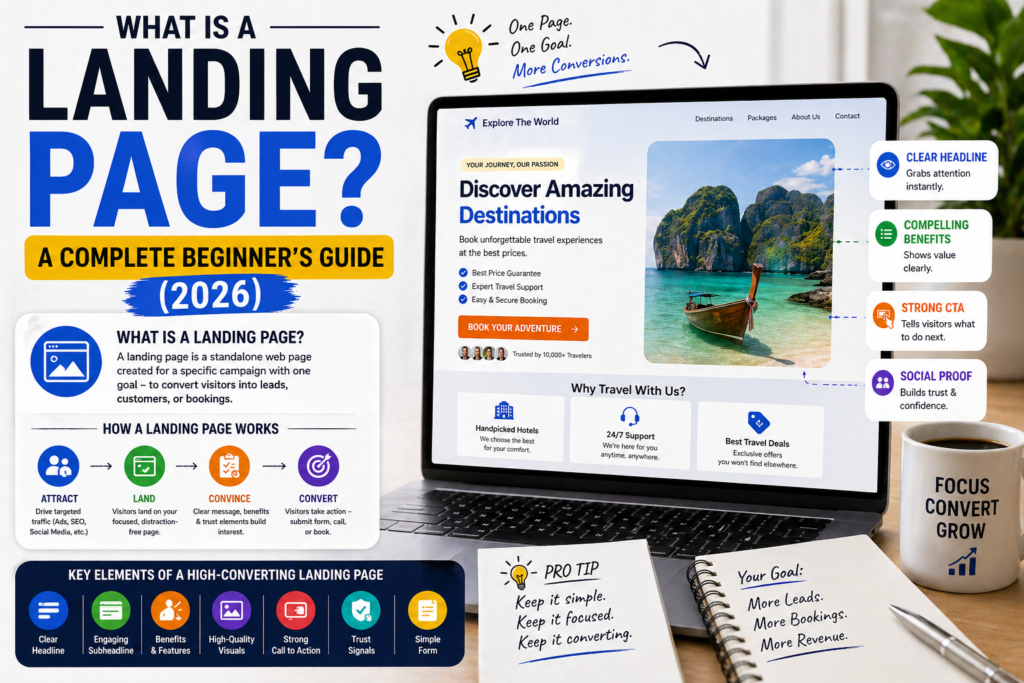
The short answer: A landing page is a standalone web page created specifically to receive traffic from a marketing campaign and convert that traffic into a single desired action — usually capturing a lead, generating a sale, or encouraging a download.
The name comes from the idea of “landing” — it’s the page a visitor lands on after clicking an ad, an email link, or a search result.
What makes a landing page different from any other web page is its singular focus. Every element on a landing page — the headline, the imagery, the copy, the form, the button — exists to move the visitor toward one specific action. Nothing else.
The Key Characteristics of a Landing Page
Single goal: One CTA, one purpose. No competing options.
No navigation menu: Most landing pages remove the site navigation entirely — there are no links to “About Us” or “Blog” to distract the visitor.
Message match: The page content directly reflects the ad or link that brought the visitor there — if your ad says “Free SEO Audit”, the landing page headline says “Get Your Free SEO Audit.”
Conversion focused: Every design and copy decision is made with one question in mind: does this help the visitor take the desired action?
Landing Page vs Homepage — What’s the Difference?
The short answer: A homepage introduces your entire business to all types of visitors; a landing page serves one specific visitor from one specific source with one specific goal. They look similar but serve fundamentally different purposes.
This is the distinction most beginners miss — and it’s the most important one to understand.
Your Homepage
Your homepage is your digital front door. It needs to serve everyone:
- First-time visitors who know nothing about you
- Returning customers looking for something specific
- Journalists researching your company
- Job seekers looking at your careers section
- Partners evaluating whether to work with you
Because it serves everyone, it has navigation menus, multiple sections, links to many different pages, and multiple CTAs. It’s designed to help different people find what they need.
A Landing Page
A landing page serves one person — the specific visitor who clicked your specific ad or email link — and gives them exactly one thing to do.
If someone clicked a Google Ad for “digital marketing course for beginners”, they want to know about that course and sign up. A landing page gives them exactly that — course details, testimonials, pricing, and a sign-up button. Nothing else.
The Conversion Rate Difference
This focus has a dramatic impact on results. Studies consistently show that dedicated landing pages convert paid traffic at 3–5× the rate of homepages.
For every 100 people who click your ad:
- Homepage: 1–2 people take action
- Landing page: 4–8 people take action
That difference compounds enormously at scale. If you’re spending £1,000/month on ads, a landing page could mean the difference between 10 leads and 40–80 leads for the same budget.
Types of Landing Pages
The short answer: There are four main types of landing pages — lead generation pages (capture contact details), click-through pages (warm visitors before a sale), sales pages (sell directly), and squeeze pages (capture email addresses with a free offer). Each serves a different goal in the customer journey.
Type 1 — Lead Generation Landing Pages
The most common type. The goal is to capture the visitor’s contact details — usually name, email, and phone number — in exchange for something valuable.
What they offer:
- A free consultation or quote
- A free guide or resource download
- Access to a webinar or event
- A free trial or demo
Who uses them: Service businesses, agencies, travel companies, coaches, consultants — anyone whose customer journey involves a conversation before a purchase.
Example: A travel agency page that says “Get Your Free Maldives Honeymoon Itinerary — Tell Us About Your Dream Trip” with a short form.
Type 2 — Click-Through Landing Pages
These pages don’t ask for contact details — they warm up the visitor before sending them to a checkout or sign-up page. The goal is to build enough desire and trust that the visitor is ready to commit by the time they reach the next step.
Who uses them: eCommerce stores, SaaS companies, subscription services.
Example: A software company’s page that explains the key benefits of their tool before a “Start Your Free Trial” button that takes you to the sign-up form.
Type 3 — Sales Landing Pages
Long-form pages designed to sell a product or service directly — without a sales call or follow-up conversation. These are typically longer than other landing pages because they need to handle all objections and build complete confidence before the visitor decides to buy.
Who uses them: Online course creators, digital product sellers, direct-to-consumer brands.
Example: A long scrolling page promoting an online digital marketing course, with a “Enrol Now — £297” button at the end.
Type 4 — Squeeze Pages / Lead Magnet Pages
A minimal landing page with one single goal: capture an email address in exchange for a free resource. These are extremely simple — a headline, a brief description of the free offer, an email field, and a button.
Who uses them: Bloggers, content creators, email marketers, anyone building an email list.
Example: A page that says “Download the Free 2026 Digital Marketing Checklist” with just an email field and a “Send It To Me” button.
What Does a Landing Page Look Like?
The short answer: A high-converting landing page has eight core elements — a benefit-driven headline, a supporting sub-headline, a hero image, a value proposition, social proof, an enquiry form or CTA button, trust signals, and an FAQ section — all working together to move the visitor toward one action.
The 8 Elements of a Landing Page
1. Headline The first thing every visitor reads. It must immediately communicate what the page is about and why the visitor should care. It should match the ad or link that brought them there.
Weak: “Welcome to Our Services” Strong: “Get Your Free Digital Marketing Audit — Find Out Exactly Why Your Ads Aren’t Converting”
2. Sub-headline One sentence that expands on the headline and invites the visitor to take action.
“Tell us about your business and we’ll identify your top 3 marketing opportunities — free, no obligation, within 24 hours.”
3. Hero Image or Video A visual that supports the headline and communicates the benefit or outcome. For service businesses, an image of the result (a happy customer, a successful outcome) works better than a photo of your office.
4. Value Proposition 3–4 bullet points or benefit statements answering: “Why should I choose this?” Focus on outcomes, not features.
5. Social Proof Reviews, testimonials, star ratings, logos of well-known clients, case study results. Social proof reduces the hesitation that stops visitors from taking action.
6. Form or CTA Button The conversion element — either a short form (for lead generation) or a button (for click-through or sales pages). Keep forms short: 3–5 fields maximum.
7. Trust Signals Security badges, certifications, guarantees, money-back offers, industry accreditations. Particularly important for higher-value offers.
8. FAQ Section Addresses the most common objections and concerns. Reduces hesitation and improves conversion rates — especially for higher-ticket offers.
Why Do Landing Pages Work So Well?
The short answer: Landing pages work because they eliminate distraction, maintain message match, and focus the visitor’s attention on a single decision — making it significantly easier and more natural to take the desired action.
The Psychology Behind Landing Pages
Reduced cognitive load: When visitors arrive on a page with one clear purpose, they don’t have to think about what to do next. The path is obvious. Fewer decisions = higher conversion rate.
Message match: When what the visitor sees on the page exactly matches what they clicked on, they feel confirmed — they’re in the right place. This builds instant trust and reduces bounce rate.
Commitment and consistency: Landing pages often use a progressive commitment approach — starting with a small ask (just your email) before a larger one (a phone call). Once someone has taken a small step, they’re more likely to take the next one.
Social proof reduces risk: Seeing that others have taken the same action and been happy with the outcome makes the decision feel safer and easier.
When Should You Use a Landing Page?
The short answer: Use a landing page any time you’re driving traffic from a specific source to a specific offer — particularly for paid advertising, email campaigns, and social media promotions.
Use a Landing Page When:
✅ Running Google Ads — every ad group should have its own dedicated landing page matching the specific keywords and ad copy
✅ Running Facebook or Instagram Ads — paid social traffic converts significantly better on focused landing pages than on homepages
✅ Promoting a specific offer — a seasonal sale, a free consultation, a new product launch
✅ Sending email campaign traffic — links in your emails that go to a specific offer or resource
✅ Promoting a lead magnet — your free guide, checklist, or template deserves its own focused download page
✅ Running any campaign where you’re tracking ROI — landing pages make it easy to measure exactly how many people converted from a specific campaign
Don’t Need a Landing Page When:
❌ Organic social media posts linking to blog content — send to the blog post directly
❌ SEO traffic to informational content — blog posts and guides should live on your website
❌ Brand awareness campaigns where there’s no specific conversion goal
How to Build Your First Landing Page
The short answer: You don’t need coding skills to build a landing page — dedicated tools like Leadpages, Unbounce, and Elementor (for WordPress) allow anyone to create professional landing pages in hours using templates and drag-and-drop editors.
Step 1 — Choose Your Tool
| Tool | Best For | Price |
|---|---|---|
| Leadpages | Beginners, small businesses | From £37/month |
| Unbounce | Conversion-focused, A/B testing | From £74/month |
| Elementor | WordPress users | Free–£4/month |
| Carrd | Simple single pages | Free–£17/year |
For most beginners, Leadpages or Elementor (if on WordPress) are the best starting points.
Step 2 — Pick a Template
Every major landing page builder has a template library. Choose a template that matches your goal (lead generation, sales, etc.) and industry. Don’t start from a blank canvas — adapting a template is faster and you get proven structure for free.
Step 3 — Write Your Copy First
Before touching the design, write your:
- Headline (benefit-driven, specific)
- Sub-headline (expands on headline + invites action)
- 3–4 benefit statements
- Form headline and button text
- One strong testimonial
Copy drives conversion more than design. Get the words right first.
Step 4 — Build and Customise
Swap the template’s placeholder content with your own:
- Replace headline and copy
- Add your own imagery
- Customise colours to match your brand
- Set up your form fields
- Connect your form to your email marketing platform
Step 5 — Connect and Track
Before publishing:
- Connect your form to your CRM or email marketing platform
- Set up a Thank You page (the page visitors see after submitting)
- Install Google Analytics or your tracking pixel
- Set up a conversion event for form submissions
Step 6 — Test Before Publishing
Test your landing page on:
- Desktop browser
- Mobile phone
- Different browsers (Chrome, Safari, Firefox)
- Submit a test form to confirm it works end-to-end
Landing Page Best Practices
The short answer: The five most impactful landing page best practices are message match (headline reflects the ad), single CTA (one action only), short form (maximum 5 fields), social proof adjacent to the form, and mobile optimisation (over 60% of traffic is mobile).
The Essential Rules
Match your headline to your ad. If your Google Ad says “Free SEO Audit”, your landing page headline must say “Get Your Free SEO Audit” — not something generic. This message match is the single highest-impact landing page improvement most businesses can make.
One CTA only. Remove navigation menus on paid traffic pages. Give visitors one choice: take the desired action or leave. Every additional link is a conversion lost.
Keep forms short. Ask only for what you genuinely need at this stage. Name and email is enough for most first-touch lead generation pages. Everything else can be gathered in the follow-up.
Put social proof next to your form. The moment of maximum hesitation is when someone is deciding whether to submit. A compelling testimonial right next to the form is the most powerful trust signal at the most critical moment.
Optimise for mobile first. Over 60% of web traffic is now mobile. Build your landing page for mobile first, then adapt for desktop — not the other way around.
Common Landing Page Mistakes ❌
1. Using your homepage as a landing page Your homepage serves everyone — it converts paid traffic poorly. Always use dedicated landing pages for paid campaigns.
2. Too many CTAs “Sign Up”, “Learn More”, “Download”, “Contact Us” — competing CTAs create confusion. One CTA per page, always.
3. Form too long Every extra field reduces completions. Start with name and email. Add fields only if the data is essential before the follow-up conversation.
4. No message match Your ad and landing page headline must reflect the same promise. A mismatch makes visitors feel they’ve landed in the wrong place — and they leave.
5. Not testing on mobile A beautiful desktop landing page that’s broken on mobile is losing the majority of its potential conversions. Test on your actual phone before publishing.
6. No follow-up after form submission A landing page that captures leads into a void — no auto-response email, no CRM entry, no follow-up sequence — wastes every conversion it generates.
Frequently Asked Questions
What is a landing page in simple terms? A landing page is a web page designed for one specific purpose — to get visitors to take one specific action, like signing up, downloading something, or requesting a quote. Unlike a website homepage that serves all types of visitors, a landing page is built for one specific audience from one specific source (like an ad or email) and removes everything that might distract them from that one action.
What is the difference between a landing page and a website? A website has multiple pages serving many different purposes — it introduces your whole business, has navigation menus, blog posts, about pages, and multiple CTAs. A landing page is a single page with one goal and usually no navigation menu. Websites build long-term credibility and support SEO; landing pages convert specific traffic sources into specific actions.
Does a landing page need to be part of a website? No — a landing page can stand alone on its own URL, completely separate from your main website. Many businesses use tools like Leadpages or Unbounce to create landing pages hosted on separate platforms or subdomains. However, landing pages that are part of your main website (on WordPress with Elementor, for example) benefit from your site’s existing SEO authority.
How long should a landing page be? It depends on the offer. For simple lead generation (free guide, free consultation), a short page of 400–600 words with a clear form converts well. For higher-value offers (an expensive product or service), longer pages of 1,000–2,000+ words are often needed to build sufficient trust and handle objections. Match page length to the complexity and value of the offer.
What should a landing page include? Every landing page should include: a benefit-driven headline, a sub-headline, a hero image or video, 3–4 benefit statements, social proof (reviews or testimonials), a form or CTA button, and trust signals. For higher-value offers, add an FAQ section to address common objections.
How do I measure if my landing page is working? The primary metric is conversion rate — the percentage of visitors who complete the desired action (form submission, button click, etc.). For lead generation pages receiving paid traffic, 3–8% is a healthy benchmark. Use Google Analytics 4 to track conversions and set up a specific conversion event for your form submissions or thank you page visits.
Can I use a landing page for SEO? Landing pages are generally not optimised for SEO because they’re short on content and focused on conversion rather than information. They can rank for very specific, transactional keywords but they’re primarily designed for paid traffic and campaign-driven traffic. For organic search, use full website pages and blog posts instead.
What is the best landing page builder for beginners? Leadpages is the most beginner-friendly dedicated landing page builder — it has an intuitive drag-and-drop editor, a conversion score feature that tells you what to improve, and good template options. For WordPress users, Elementor is the best option because it integrates with your existing site and is free to start. For the simplest possible pages, Carrd is free and takes minutes to set up.
Final Thoughts
Now you know what a landing page is — and more importantly, why it matters and how to use one effectively.
The core idea is simple: when you’re driving specific traffic from a specific source to a specific offer, give that traffic a dedicated, focused page built for that exact purpose. Don’t send it to your homepage. Don’t give it a menu with 10 options. Give it one compelling offer and one clear path forward.
That’s what a landing page does. And done well, it’s one of the most powerful conversion tools available to any business — regardless of size, budget, or industry.
Whether you’re running Google Ads, Facebook Ads, email campaigns, or social media promotions — a well-built landing page will consistently outperform any other page on your website for converting that traffic into leads and customers.
Ready to build your first landing page? Read our guides on landing page best practices and how to write landing page copy that converts to make sure yours is built the right way from the start. 🚀