

🎯 TL;DR
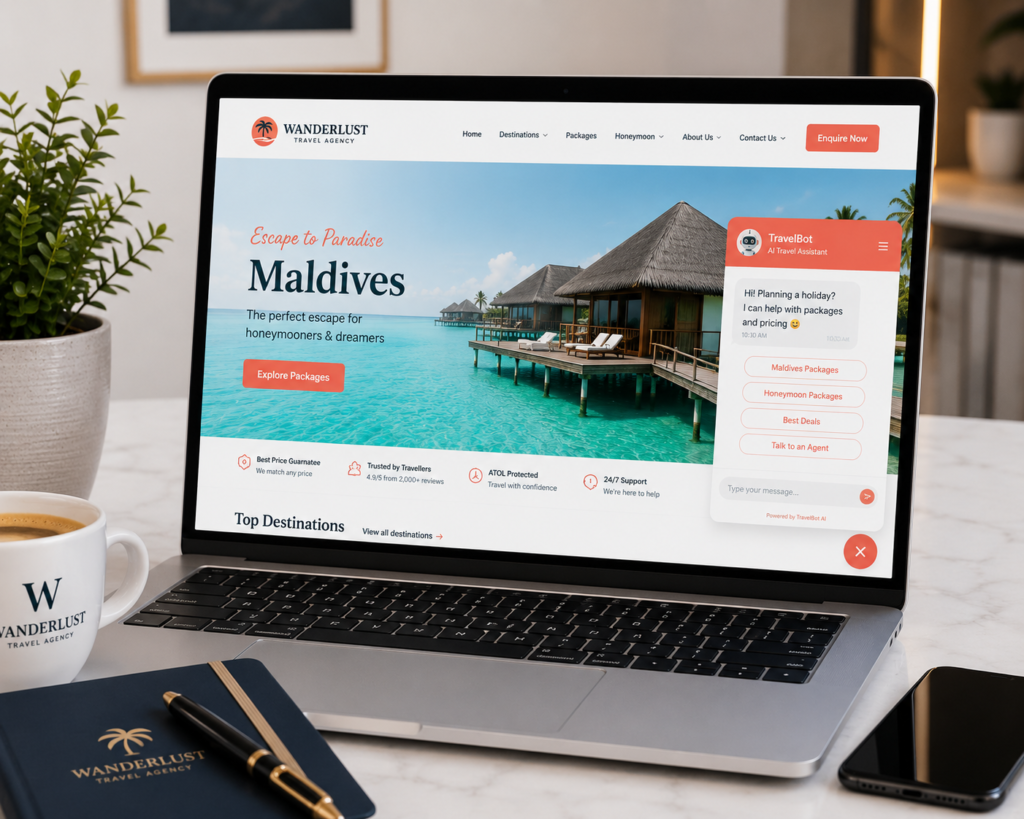
A chatbot for your travel agency website is an AI-powered tool that answers visitor questions, captures enquiry details, and qualifies leads automatically — 24 hours a day, 7 days a week, without requiring you to be online. In 2026, AI chatbots handle 95% of customer service interactions across many industries, and travel agencies using website chatbots report significantly faster response times, higher lead capture rates, and fewer lost enquiries. The most practical chatbot options for small travel agencies are Tidio (free starter plan), Tars (travel-specific), and a simple WhatsApp Business automated response — all deployable without any coding.
💡 Summary
Most travel agency website visitors who don’t find an immediate answer to their question leave without enquiring. A chatbot catches them — answering common questions instantly, capturing their contact details, and either resolving their query or routing them to you for follow-up.
This guide covers what a travel agency chatbot does, which tools work best, how to set one up, the scripts that convert visitors into enquiries, and how to avoid the common mistake of making chatbots feel robotic and unhelpful.
Why a Chatbot Is Valuable for a Travel Agency
The short answer: A potential client who visits your website at 11pm on a Friday and gets no response to their question is likely to enquire with the first agency that does respond — which won’t be you unless you have a chatbot.
Travel is planned outside business hours. Couples browse Maldives packages on Sunday evenings. Families research Europe holidays on Friday nights. Parents plan school holiday trips at midnight when their children are finally asleep. These are the moments when the desire to book is at its peak — and the moments when most travel agencies are unavailable.
A chatbot solves this availability problem. It answers the most common questions immediately (“Do you arrange flights?”, “What is your price range for Maldives?”, “Do you help with visas?”), captures the visitor’s contact details, and ensures every enquiry is followed up the next morning.
Research shows that responding to a lead within 5 minutes makes you 100 times more likely to convert them than responding within 30 minutes. A chatbot does not respond within 5 minutes — it responds instantly, at any hour.
What a Travel Agency Chatbot Should Do
The short answer: A chatbot for a travel agency has three jobs: answer common questions, capture lead details, and create a warm handoff to a human agent for complex enquiries.
A well-configured travel agency chatbot handles:
Frequently Asked Questions: – “Do you arrange flights and hotels together?”
– “What destinations do you specialise in?”
– “What is the price range for your packages?”
– “Do you help with visa applications?”
– “How do I start planning a trip with you?”
Lead Capture:
– Name, phone number, WhatsApp, email
– Destination of interest
– Travel dates (approximate)
– Group size
Warm Handoff:
– “Thanks for sharing those details! One of our travel specialists will WhatsApp you within 4 hours with some initial ideas. Can I ask a quick question — is this for a honeymoon, family holiday, or something else?”
The chatbot collects the information your team needs for a productive first conversation — so when you follow up, you already know the destination, dates, and trip type.
Internal link: Combine your chatbot lead capture with a CRM to ensure every enquiry is tracked and followed up. Read our guide on travel agency CRM for the complete system.
The Best Chatbot Tools for Travel Agencies in 2026
The short answer: For most small travel agencies, Tidio (free plan) is the fastest and easiest chatbot to deploy. For travel-specific workflows with deeper customisation, Tars or ManyChat are stronger options.
| Tool | Cost | Best For | Key Feature |
|---|---|---|---|
| Tidio | Free (basic) / $29+/month | Small agencies wanting a quick start | Live chat + AI chatbot + email in one |
| Tars | From $99/month | Travel agencies wanting branded flows | Travel-specific templates, lead forms |
| ManyChat | Free / $15+/month | Agencies using Instagram + Facebook | Omnichannel (web, Instagram, Facebook, WhatsApp) |
| WhatsApp Business | Free | Agencies wanting mobile-first enquiries | Automated greeting + away messages |
| Intercom | From $39/month | Growing agencies with higher volume | Advanced AI, CRM integration, analytics |
For most small travel agencies: start with Tidio. The free plan includes a live chat widget, a basic AI chatbot, and email notifications when a visitor starts a conversation. It installs on WordPress with a single plugin and takes under an hour to configure.
Setting Up Your Travel Agency Chatbot: Step-by-Step
The short answer: A basic travel agency chatbot can be live on your WordPress site in under two hours using Tidio. The configuration is a one-time investment that runs 24/7 thereafter.
Step 1 — Install Tidio on WordPress Search for “Tidio” in your WordPress plugin directory, install, and activate. Connect your email address to receive chatbot notifications.
Step 2 — Set your welcome message
This is the first message visitors see when the chatbot opens. Keep it warm and specific:
“Hi! 👋 Welcome to [Agency Name]. Planning a holiday? I can help with packages, pricing, and destinations. What are you looking for?”
Step 3 — Build your FAQ responses
In Tidio’s chatbot builder, create automated responses for your 5–8 most common questions. When a visitor types “do you do Maldives?” or “how much does a Bali trip cost?”, the chatbot responds instantly with the relevant information.
Step 4 — Build your lead capture flow
Create a conversational flow that collects the visitor’s details:
“I’d love to help you plan that trip! To get started, can I take your name and WhatsApp number? One of our specialists will send you some package ideas within 4 hours.”
Step 5 — Set your offline message and hours
During non-business hours, configure the chatbot to collect details and set expectations: “We’re currently offline, but we’ll WhatsApp you first thing tomorrow morning with some ideas for your [destination] trip!”
Chatbot Scripts That Convert Travel Agency Visitors
The short answer: The most effective chatbot scripts for travel agencies are warm, conversational, and specific — they sound like a helpful team member, not an automated system.
Opening Script (Greeting):
“Hi there 👋 Welcome to [Agency Name]! Are you planning a holiday? I can help with packages, pricing, and visa requirements — or connect you directly with one of our travel specialists. What brings you here today?”
Lead Capture Script:
“Brilliant choice! The Maldives is one of our most popular destinations. To put together some package ideas for you, could I grab your name and WhatsApp number? We’ll send you a few options within 4 hours — completely free, no obligation.”
FAQ Script (Pricing):
“Our Maldives packages start from AED 3,800 per person for 5 nights, including flights and accommodation. Prices vary depending on the resort and time of year. Would you like us to put together a personalised quote based on your dates and preferences?”
Out of Hours Script:
“We’re offline right now, but we don’t want you to leave empty-handed! Drop your name and WhatsApp number and we’ll message you first thing tomorrow morning with package options. Sound good?”
Common Chatbot Mistakes Travel Agencies Make
The short answer: The most common mistake is making the chatbot too robotic — long response delays, rigid menu systems, and responses that don’t understand natural language. A chatbot that frustrates visitors is worse than no chatbot at all.
Mistake 1 — Too many menu options A chatbot that opens with “Please choose: 1. Destinations 2. Pricing 3. Visa 4. Contact 5. Other” feels like a phone tree, not a conversation. Start with an open question and let the visitor’s response guide the flow.
Mistake 2 — Asking for too much information upfront
Asking for name, email, phone, WhatsApp, destination, dates, budget, and group size before giving any value drives abandonment. Ask for name and WhatsApp number only — then collect additional details in the human follow-up conversation.
Mistake 3 — Slow or no handoff to a human
A chatbot should capture leads, not close them. When a visitor is clearly ready to enquire, hand off to a human immediately: “Great — I’ll flag this to our team right now and you’ll hear from us within 4 hours.”
Mistake 4 — Not monitoring chatbot conversations
Review your chatbot conversations weekly. What questions are visitors asking that the bot can’t answer? What responses are causing drop-offs? Improve the scripts based on real visitor behaviour.
Internal link: Your chatbot is one part of a broader lead generation system. Read our guide on how to generate travel leads online for the complete picture.
Final Thoughts — A Chatbot Is a 24/7 Sales Team Member That Costs Nothing to Deploy
The best travel agencies in 2026 respond to enquiries faster than anyone else. A chatbot makes it possible to respond instantly — at 2am on a Saturday — and capture leads that would otherwise leave your website without enquiring.
Set it up once. Configure your scripts. And let it capture enquiries while you sleep.
Your action step: Install Tidio on your WordPress site this week (free, takes under an hour). Configure your welcome message and one FAQ response. That is your chatbot live — catching the enquiries your competitors are missing.
FAQ — Chatbots for Travel Agencies
1. Do I need technical skills to set up a chatbot on my travel agency website?
No. Tools like Tidio install on WordPress as a standard plugin — no coding required. The chatbot builder uses a visual drag-and-drop interface for creating conversation flows. Most travel agency owners can have a basic chatbot live in under two hours without any developer help.
2. Will a chatbot replace my personal service as a travel agent?
No — and it should not try to. A travel agency chatbot handles the initial interaction: answering common questions, capturing contact details, and setting expectations for follow-up. The relationship-building, itinerary planning, and personalised service that make you valuable as an agent remain entirely human. Think of the chatbot as your receptionist — it greets visitors, takes their details, and passes them to you for the real conversation.
3. What is the best free chatbot for a travel agency website?
Tidio’s free plan is the best starting point for most small travel agencies. It includes a live chat widget, basic AI chatbot, and email notifications for new conversations. WhatsApp Business (free) is a strong complement for UAE agencies — its automated greeting and away messages capture visitors who prefer WhatsApp over website chat.
4. Can I connect my chatbot to WhatsApp?
Yes. ManyChat and several other tools allow you to run chatbot flows across your website, Instagram, Facebook, and WhatsApp simultaneously. This is particularly valuable for UAE travel agencies where WhatsApp is the dominant communication channel. Visitors who start a conversation on your website can be seamlessly redirected to continue on WhatsApp.
5. How do I know if my chatbot is working?
Track: number of conversations started, lead capture rate (what percentage of conversations result in a name and contact number being collected), enquiry-to-booking rate from chatbot leads, and visitor questions that the bot couldn’t answer. Review conversations weekly for the first month to identify gaps in your FAQ responses and improve scripts based on real visitor behaviour.
6. Should my chatbot pretend to be human?
No — and in most markets, this is a transparency requirement. Your chatbot should identify itself as a bot or automated assistant in the opening message. However, using a name (“Hi, I’m TravelBot from [Agency Name]!”) and a warm, conversational tone makes it feel friendly and helpful without being deceptive. Visitors who discover a chatbot has been pretending to be human feel misled — which damages trust immediately.
7. Can a chatbot help me qualify leads before I follow up?
Yes — this is one of its most valuable functions. A well-configured chatbot collects destination, approximate dates, group size, and budget range before passing the lead to you. When you follow up via WhatsApp, you already have the context you need for a productive first conversation — rather than spending the first five minutes asking basic questions.
8. Is a chatbot secure for collecting client contact details?
Reputable chatbot tools (Tidio, Tars, ManyChat, Intercom) store data securely and are GDPR-compliant. Ensure the tool you use has a clear privacy policy and data processing agreement. Include a brief privacy notice in your chatbot flow (“We’ll use your details to respond to your enquiry only — see our privacy policy”) and never store chatbot data in insecure locations. Review the data retention policies of your chosen tool.