
🎯 TL;DR
A travel agency CRM (Customer Relationship Management) system is software that stores every client’s contact details, booking history, travel preferences, and communication history in one place — so you never lose a lead, forget a follow-up, or miss a repeat booking opportunity. Research shows that acquiring a new client costs 5–7 times more than retaining an existing one, and repeat travellers book more frequently, spend more per trip, and refer more often. The most effective CRM options for small travel agencies in 2026 are HubSpot CRM (free), Zoho CRM (affordable), and travel-specific tools like Travefy and ClientBase.
💡 Summary
Most small travel agencies manage their clients through a combination of WhatsApp chats, email threads, and memory. This works when you have 20 clients. It breaks down completely when you have 200 — and it means you are constantly leaving repeat booking and referral revenue on the table.
A CRM changes everything. It gives you a single view of every client relationship, automates follow-ups, and makes it impossible to forget that a couple’s anniversary trip is coming up or that a family enquired about Bali six months ago but never booked.
This guide covers what a CRM does, which tools work best for travel agencies, how to set one up, and the workflows that turn a CRM from a contact database into an active booking engine.
What a CRM Does (And Why Spreadsheets Are Not Enough)
The short answer: A spreadsheet stores information. A CRM uses that information to trigger actions — follow-up reminders, automated emails, booking anniversaries — that keep your agency top of mind and generate repeat revenue without manual effort.
Most travel agencies start with a spreadsheet to track client bookings. This is fine at the beginning. But a spreadsheet cannot:
- Remind you to follow up with a lead who enquired three weeks ago
- Automatically send a “Happy Anniversary — ready to start planning?” email on the date of a client’s honeymoon trip
- Show you at a glance that you haven’t heard from a client in 12 months
- Tag clients by travel preference so you can send targeted offers (beach clients vs. city break clients vs. adventure travellers)
- Track where each enquiry came from (Google, Instagram, referral) so you know which marketing channels are working
A CRM does all of this — and for many tools, it does it for free.
The Best CRM Tools for Travel Agencies in 2026
The short answer: Start with HubSpot CRM (free) if you want the most powerful free option, Zoho CRM if you need affordable automation, or Travefy/ClientBase if you want a travel-industry-specific tool that integrates with booking systems.
| CRM Tool | Cost | Best For | Key Feature |
|---|---|---|---|
| HubSpot CRM | Free | Agencies of any size starting out | Contact management, deal pipeline, email tracking |
| Zoho CRM | From $14/month | Agencies wanting automation | Workflow automation, email sequences, lead scoring |
| Travefy | From $59/month | Agencies needing itinerary + CRM | Built-in itinerary builder, client portal, booking tracking |
| ClientBase | Custom pricing | Established agencies | Travel-specific fields, booking system integration |
| Pipedrive | From $14/month | Sales-focused agencies | Visual deal pipeline, activity reminders |
For most small travel agencies, HubSpot CRM is the right starting point. The free plan includes unlimited contacts, a deal pipeline for tracking enquiries, email tracking, and a meeting scheduler — everything needed to manage client relationships effectively. The learning curve is minimal and there is no cost barrier to getting started.
The 5 Things Every Travel Agency Should Track in Their CRM
The short answer: A CRM is only as useful as the data you put into it. These five data points, captured consistently for every client, turn your CRM into a repeat booking machine.
1. Full Contact Details
Name, email, phone (WhatsApp number), home country/emirate, preferred language. For UAE agencies, note whether the client communicates primarily in English or Arabic — this affects how you tailor your follow-up messages.
2. Booking History
Every trip booked: destination, travel dates, package type, hotel name, number of travellers, total booking value. This gives you a clear picture of each client’s travel habits and budget range.
3. Travel Preferences
Beach or city? Luxury or mid-range? Adventure or relaxation? Solo, couple, or family? Dietary requirements? Preferred airlines? Capture these during the enquiry process and tag the contact in your CRM accordingly.
4. Key Dates
Wedding anniversary, birthday, travel anniversary (the date they return from each trip). These dates are gold — they give you a natural, non-pushy reason to reach out at exactly the right moment.
5. Lead Source
Where did this client come from? Google search, Instagram, WhatsApp referral, Facebook Ad, walk-in? This data, tracked consistently, tells you which marketing channels are generating your most valuable clients.
Internal link: Understanding which channels drive your best clients is the foundation of an effective lead generation strategy. Read our guide on how to generate travel leads online for the complete system.
The Travel Agency CRM Workflow — From Enquiry to Repeat Booking
The short answer: The most effective CRM workflow for travel agencies follows four stages: capture, qualify, convert, and retain. Each stage has specific CRM actions that ensure no lead or client falls through the cracks.
The 4-Stage CRM Workflow
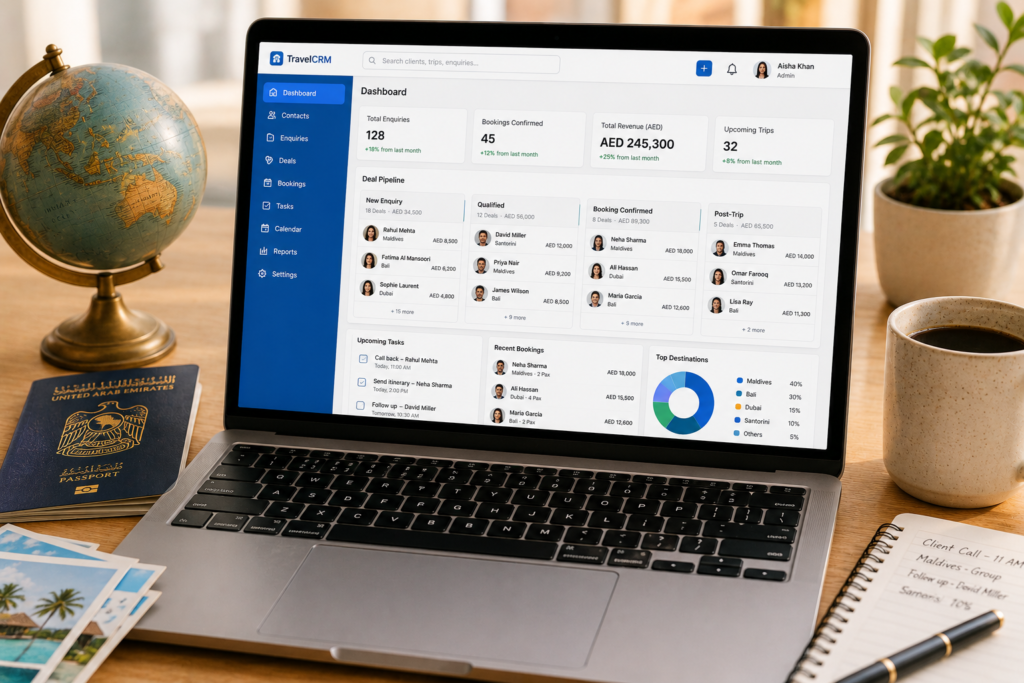
Stage 1 — Capture Every new enquiry — from your website form, WhatsApp, Instagram DM, or phone call — gets immediately added to your CRM as a new contact. Set a pipeline stage of “New Enquiry.” Never let an enquiry sit in your WhatsApp inbox without being logged.
Stage 2 — Qualify
Within 24 hours, you’ve spoken to the lead and established their destination, travel dates, budget, and group size. Update the CRM with these details and move the pipeline stage to “Qualified Lead.” Set a follow-up reminder for 3 days if no booking decision has been made.
Stage 3 — Convert
Once the client confirms their booking and pays a deposit, move them to “Booking Confirmed” in your pipeline. Log all booking details, add their travel dates to your calendar, and set a pre-departure follow-up reminder (typically 2 weeks before travel) and a post-return follow-up (3–5 days after return).
Stage 4 — Retain
This is where most agencies stop using their CRM — and where the real revenue is lost. After the client returns:
– Send a post-trip WhatsApp message (logged in CRM)
– Request a Google review (logged in CRM)
– Set an anniversary reminder 12 months from their travel date
– Tag them with their travel preferences for future targeted campaigns
A client tagged as “Maldives, luxury, honeymoon, couple” in your CRM can receive a targeted email 18 months later: “Our new Maldives overwater villa partner just launched an anniversary special — we thought of you immediately.”
Internal link: The post-return follow-up is also the perfect moment to ask for a referral. Read our guide on how to build a referral programme for your travel agency to combine both systems.
Setting Up Your First CRM: Step-by-Step
The short answer: You can have a basic HubSpot CRM set up and ready to use in under two hours. Start simple — a contact database and a deal pipeline — and add automation as you become comfortable with the tool.
Step 1 — Create your free HubSpot account at hubspot.com/crm. No credit card required.
Step 2 — Customise your contact properties. Add custom fields for: destination preference, travel style (luxury/mid-range/budget), key dates (anniversary, birthday), lead source, and preferred language.
Step 3 — Build your deal pipeline. Create stages: New Enquiry → Qualified Lead → Proposal Sent → Booking Confirmed → Post-Trip Follow-Up → Repeat Client.
Step 4 — Import your existing clients. Export your current client list from wherever you store it (spreadsheet, email, WhatsApp) and import it into HubSpot. Spend one afternoon enriching the records with destination history and key dates.
Step 5 — Set up your first automation. In HubSpot’s free plan, you can create basic email sequences. Set up a 3-email post-trip sequence: Day 3 (how was your trip?), Day 7 (review request), Day 14 (referral ask). This sequence runs automatically for every client who returns from a trip.
Final Thoughts — A CRM Turns One-Time Clients Into Lifelong Ones
A travel agency CRM is not just an organisational tool. It is your repeat booking engine. Every client detail you capture, every preference you record, and every follow-up you automate is an investment in a relationship that will pay back in repeat bookings, referrals, and reviews for years.
The agencies growing consistently in 2026 are not necessarily the ones spending the most on advertising. They are the ones doing the best job of staying in touch with the clients they already have.
Your action step: Sign up for a free HubSpot CRM account today. Add your last 10 clients as contacts. Record their destination, travel dates, and one key date (anniversary or birthday). That is your CRM started — in under an hour.
FAQ — Travel Agency CRM
1. Do I need a CRM if I’m a solo travel agent?
Yes — arguably more so than a larger agency. As a solo agent, your client relationships are entirely managed by you. A CRM ensures that no follow-up is forgotten, no anniversary is missed, and no lead goes cold because you were busy with another booking. Even the free HubSpot plan is more than sufficient for a solo agent managing up to several hundred clients.
2. What is the best free CRM for a travel agency?
HubSpot CRM is the best free option for most travel agencies. It offers unlimited contacts, a customisable deal pipeline, email tracking, and basic automation on the free plan. Zoho CRM also has a free tier (up to 3 users) with slightly more automation capabilities. For a travel-specific free option, Travefy offers a free trial that includes basic itinerary and client management features.
3. How is a travel agency CRM different from a regular CRM?
A general CRM like HubSpot or Zoho can be customised for travel agencies by adding destination, travel preference, and booking history fields. Travel-specific CRMs like Travefy and ClientBase come with these fields pre-built and integrate directly with booking platforms and itinerary builders. For most small agencies, a customised general CRM is sufficient. Travel-specific CRMs become worthwhile when you are managing complex multi-destination itineraries for many clients simultaneously.
4. How do I migrate my client data from spreadsheets to a CRM?
Export your spreadsheet as a CSV file. Most CRMs (including HubSpot) have a straightforward CSV import tool that maps your spreadsheet columns to CRM fields. Clean your data before importing — remove duplicates, standardise date formats, and ensure all phone numbers include country codes. Allow half a day for the import and data enrichment process for most small agency client lists.
5. Can I use my CRM for WhatsApp communication?
Not directly on the free plan of most CRMs. However, you can log WhatsApp interactions manually as notes within a contact record, and set follow-up reminders based on WhatsApp conversations. Some CRM tools (including Zoho and HubSpot’s paid plans) offer WhatsApp integration that logs messages automatically. For most small agencies, manual logging combined with WhatsApp’s own labelling system is sufficient.
6. How long does it take to set up a travel agency CRM?
A basic CRM — contact database, deal pipeline, and first few contacts — can be set up in two to four hours. A fully configured system with custom fields, automated email sequences, and imported client history takes one to two days. The investment is worthwhile: a well-configured CRM saves several hours per week in manual follow-up and ensures no client relationship is neglected.
7. Will a CRM help me get more referrals?
Yes — significantly. A CRM with anniversary and key date reminders ensures you contact clients at exactly the right moment for a referral ask. It also allows you to identify your top referrers and acknowledge them with personalised outreach. Agencies using CRM-automated follow-up consistently report 2–3x more referral enquiries than those relying on ad hoc outreach.
8. How do I measure whether my CRM is working?
Track: enquiry-to-booking conversion rate (what percentage of leads convert to confirmed bookings), repeat booking rate (what percentage of past clients book again within 18 months), referral rate (what percentage of new enquiries come from existing clients), and average time to follow up on new enquiries (aim for under 4 hours). Review these metrics quarterly. A well-used CRM should show measurable improvement in all four within 90 days.