
🎯 TL;DR
Your Google Business Profile (GBP) is the free listing that appears in Google Search and Google Maps when someone looks for a travel agency near them — and it’s the single most important free marketing tool available to independent agencies. Businesses with complete, active profiles appear 18 times more often in local search results and receive 70% more visits than incomplete ones. The five steps in this guide — claiming your profile, choosing the right categories, adding photos, publishing regular Google Posts, and optimising your services and Q&A — can be completed in under two hours and will immediately improve your local visibility.
💡 Summary
Most travel agencies either haven’t set up their Google Business Profile at all, or created one years ago and never touched it since. In both cases, they’re invisible to potential clients searching for a travel agency in their area right now.
In 2026, Google Business Profile has evolved from a simple directory listing into an AI-powered local search hub. Google uses it to decide which travel agencies appear at the top of Maps and local search results — and it rewards profiles that are complete, active, and regularly updated.
This step-by-step guide walks through the entire optimisation process: claiming and verifying your profile, writing a description that ranks, selecting the right photos, publishing Google Posts, and tracking your performance. Everything in this guide is free and can be implemented without any technical expertise.
Why Your Google Business Profile Is Your Most Powerful Free Marketing Tool
The short answer: Before a potential client visits your website, reads your reviews, or contacts you, they see your Google Business Profile. An incomplete or neglected profile hands those clients directly to competitors with better-optimised listings.
When someone in Dubai, Sharjah, or Abu Dhabi types “travel agency near me” or “best travel agency for Maldives holidays” into Google, three businesses appear at the very top of the results — above all organic website listings. This is called the Local Pack, and it is driven almost entirely by Google Business Profile signals.
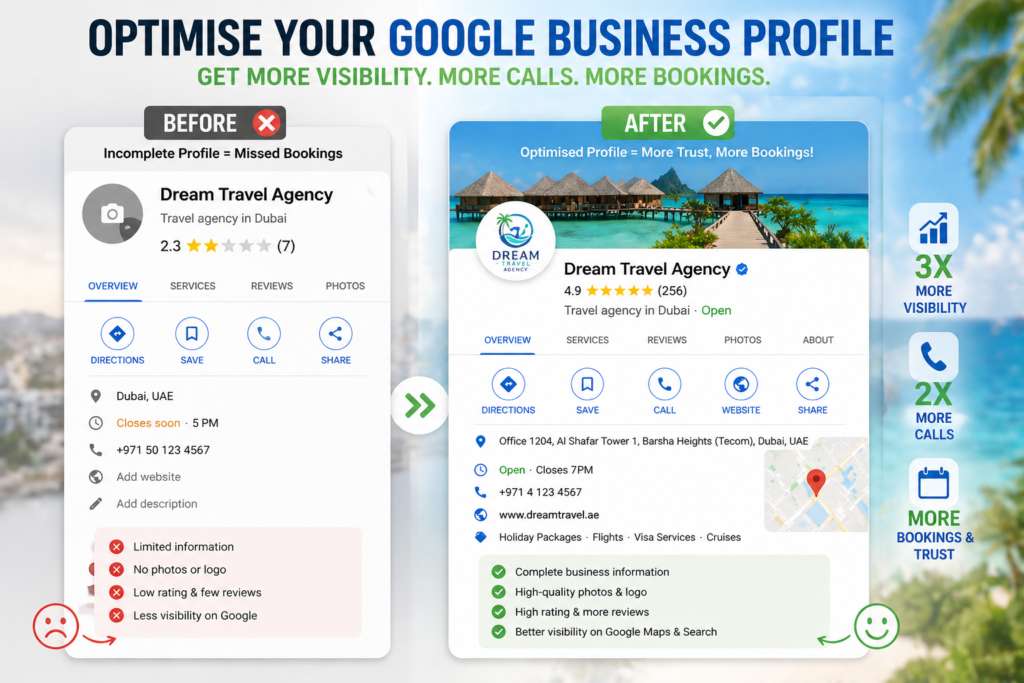
The numbers make the case clearly. According to Google’s own data, businesses with complete profiles are twice as likely to be considered reputable by users. Profiles featuring quality photos generate 40% more direction requests and 31% more website clicks than those without. Fully optimised profiles appear 18 times more often in search results and receive 70% more visits.
For small and independent travel agencies competing against large OTAs and franchise chains, this is the most level playing field in digital marketing. A boutique agency with a perfectly optimised GBP can outrank a much larger competitor with a neglected one — purely on the strength of profile quality, review activity, and posting consistency.
The best part: it costs nothing. Every feature covered in this guide is completely free.
Step 1 — Claim, Verify and Complete Your Profile
The short answer: If you haven’t claimed your Google Business Profile yet, someone else might — and an unclaimed profile is a missed opportunity every single day it remains unverified.
How to Claim Your Profile
Go to business.google.com and search for your agency name. Google may already have a profile for your business based on data from other directories. If it exists, claim it. If not, create a new one.
The process:
- Go to business.google.com and sign in with a Google account
- Search for your business name and select it (or click “Add your business”)
- Choose your business category — select “Travel Agency” as your primary category
- Add your location (if you have a physical office) or set your service area
- Add your phone number and website URL
- Complete verification
Verification
Google offers several verification methods. For most travel agencies, the options are:
- Postcard — Google mails a postcard with a verification code to your business address (takes 5–14 days)
- Phone or SMS — available for some businesses, instant
- Video verification — increasingly common in 2026; requires a short video showing your business location and signage
Complete verification before doing anything else. An unverified profile has extremely limited visibility in local search.
The 10 Fields Most Agencies Leave Incomplete
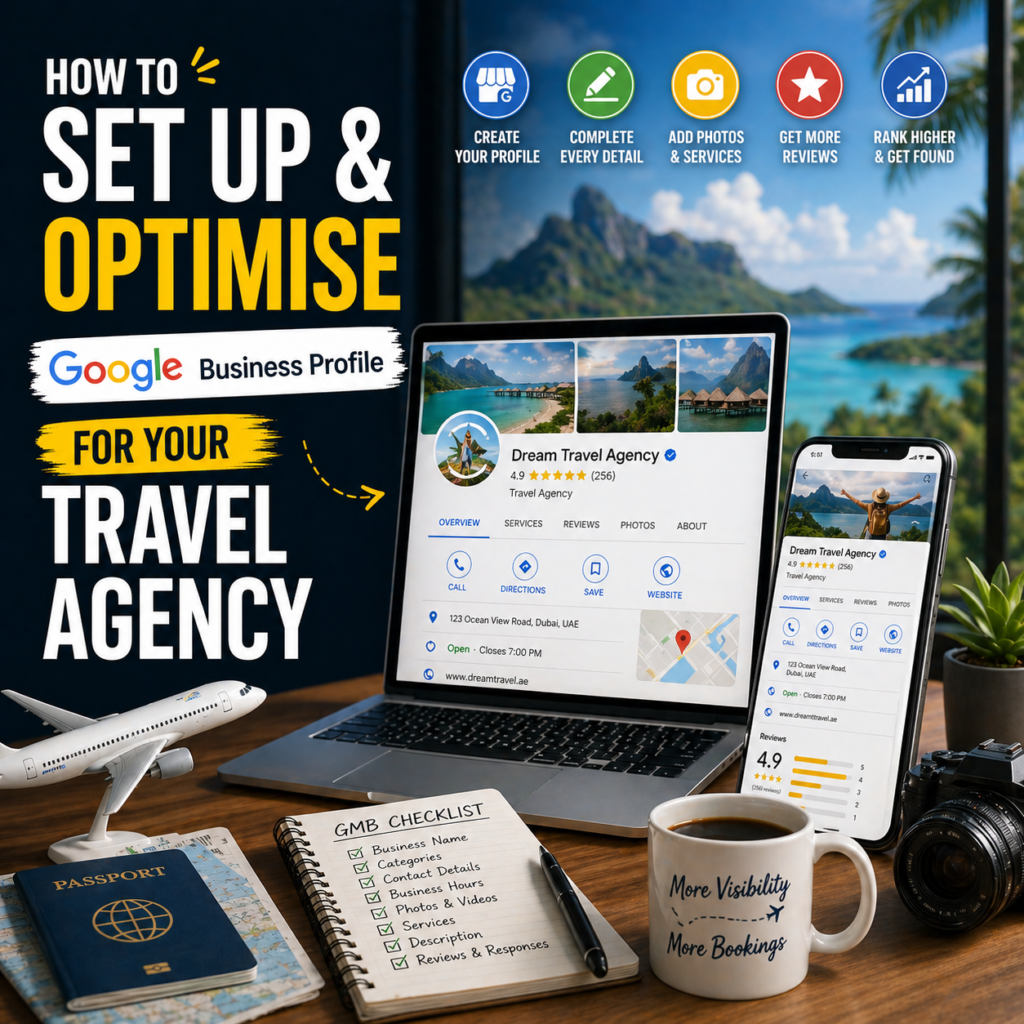
Once verified, complete every available field. Each one is a ranking signal:
| Field | Why It Matters |
|---|---|
| Business name | Must match exactly what’s on your website and other directories |
| Primary category | The single most important ranking factor — “Travel Agency” |
| Secondary categories | Expand your reach to additional search queries |
| Business description | 750 characters to include keywords and your unique selling points |
| Phone number | Must match your website contact page exactly |
| Website URL | Direct link to your homepage or a specific landing page |
| Hours of operation | Keep updated — inaccurate hours trigger negative reviews |
| Service areas | List every emirate or city you serve |
| Services | Individual listings with descriptions (covered in Step 5) |
| Attributes | Trust signals like “Online appointments”, “Verified” |
Profiles filled out entirely receive 70% more visits. Leaving any field blank signals to Google — and to potential clients — that your business may not be actively managed.
Step 2 — Choose the Right Categories and Write a Keyword-Rich Description
The short answer: Your primary category is the single most influential ranking factor in your entire Google Business Profile. Get it right and everything else becomes easier. Get it wrong and no amount of optimisation elsewhere will compensate.
Choosing Your Primary Category
Select “Travel Agency” as your primary category. This tells Google exactly what searches you should appear for — and it directly determines whether you show up in the local pack when someone searches “travel agency Dubai” or “travel agent near me.”
Do not choose a broader category like “Tour Operator” or “Tourism” as your primary — these will dilute your relevance for the high-intent searches that matter most.
Secondary Categories to Add
Secondary categories expand your visibility to related search queries. Depending on your agency’s specialisations, add any that apply:
- Tour Operator
- Cruise Agency
- Holiday Accommodation
- Airline Ticket Agency
- Vacation Home Rental Agency
Each secondary category opens up additional search queries your profile can appear for, without diluting your primary “Travel Agency” ranking signal.
Writing a GBP Business Description That Ranks and Converts
You have 750 characters for your business description. Use them. Here’s what an optimised description looks like for a UAE-based travel agency:
“[Agency Name] is a Dubai-based travel agency specialising in bespoke holiday packages, honeymoon experiences, family vacations, and group travel across the Maldives, Europe, Southeast Asia, and beyond. With over [X] years of experience serving clients across the UAE, we handle everything from flights and hotels to visa support and transfers — so you can focus on the experience, not the logistics. Contact us to start planning your next journey.”
Notice what this description does:
- Opens with the business name and location (Dubai-based) — a local keyword signal
- Lists specific specialisations (honeymoon, family, group travel) — matches search queries
- Names key destinations (Maldives, Europe, Southeast Asia) — matches destination-specific searches
- Explains the value proposition clearly (end-to-end service)
- Ends with a soft CTA
Avoid vague phrases like “we offer the best travel deals” or “#1 travel agency in Dubai.” Google’s guidelines prohibit superlatives, and they add zero credibility to readers.
Step 3 — Add Photos and Videos That Convert Browsers Into Enquiries
The short answer: Google rewards active profiles. Adding new photos at least twice a week is one of the fastest ways to signal to Google’s algorithm that your profile is live, current, and worth showing to searchers.
Why Photos Matter More Than Most Agencies Realise
Profiles with quality photos receive 40% more direction requests and 31% more website clicks than profiles without them. In a visual industry like travel, this gap is even wider — potential clients are making emotional decisions, and a strong set of photos communicates trust, professionalism, and aspiration before they’ve read a single word.
The Travel Agency GBP Photo Stack
Build your profile photos around these five categories:
1. Office / Team Photos A photo of your team, your office space, or your agents at their desks signals that you’re a real, established business — not a one-person operation working from a laptop. For UAE clients in particular, seeing a professional office environment builds immediate trust.
2. Destination Photos High-quality images of the destinations you specialise in — Maldives overwater villas, European cityscapes, African safari landscapes. These make your profile visually compelling and signal to Google which destinations you’re associated with.
3. Client Trip Photos (With Permission) Real photos from client holidays are the most powerful trust-building images you can add. A family on a beach in Mauritius, a couple at a Bali resort, a group on a Kenyan safari — with the client’s permission, these are irreplaceable social proof.
4. Certificates and Awards Any IATA certification, tourism board membership, or industry award photograph signals credibility and authority.
5. Short Video Clips GBP supports short video uploads. A 30–60 second clip — a destination highlight, a client testimonial, or a quick introduction to your team — adds significant engagement value and is still relatively rare on travel agency profiles, giving you a competitive edge.
Posting Frequency
In 2026, Google’s algorithm treats photo and post activity as a freshness signal. Profiles that haven’t added a photo in over 30 days can experience noticeable drops in local visibility. Set a weekly reminder to add at least two new photos — these can be destination images, client trip shots, or promotional graphics created in Canva.
Internal link: For a complete guide to creating travel content visuals, including destination photos and social graphics, read our post on AI content marketing tools for travel agencies.
Step 4 — Use Google Posts to Stay Active and Rank Higher
The short answer: Google Posts are short updates published directly on your Business Profile. Most travel agencies never use them — which means the ones that do have an immediate visibility advantage.
Google Posts appear directly in your profile when someone searches for your agency or finds your listing in Maps. They signal to Google that your profile is actively managed — a direct positive ranking factor. Businesses that post consistently are treated as more relevant and current than those that don’t.
The 4 Google Post Types for Travel Agencies
1. Offer Post Promote a specific holiday package or limited-time deal. Include the destination, key inclusions, price point, and a deadline. Example: “7 nights in the Maldives from AED 4,500 per person — includes flights, overwater villa, and daily breakfast. Available for departures in July and August. Book before 30 June.”
2. Update Post Share general agency news — a new destination partnership, a team FAM trip, a new package launch. These keep your profile feeling active and human. Example: “We’ve just returned from a familiarisation trip to Sri Lanka — and we’ve put together a brand new 10-day itinerary based on what we discovered. DM us for details.”
3. Event Post Promote a specific booking event, travel exhibition, or virtual consultation session with a start and end date.
4. Product Post Showcase a specific package as a product listing — include a photo, description, price range, and a “Book now” or “Enquire” button linking to your website or WhatsApp.
Posting Cadence
Post a minimum of twice per week. This doesn’t need to be elaborate — a single destination photo with two sentences of copy counts as a post. The goal is consistent activity, not perfection.
Batch your Google Posts alongside your social media content during your weekly content session. If you’re already writing Instagram captions for the week, adapt one or two of them into Google Posts. The extra time investment is minimal.
Internal link: For a full weekly content batching system that includes Google Posts alongside social media, read our guide on how to create a content calendar for travel agencies.
Step 5 — Optimise Your Services, Q&A and Attributes
The short answer: The Services, Q&A, and Attributes sections are where most travel agencies leave significant ranking and conversion value on the table. Five minutes per section can make a meaningful difference to both your visibility and your enquiry rate.
Services
The Services section allows you to list every type of holiday or travel service your agency offers, each with its own name, description, and optional price range. This gives Google additional keyword-rich data to index your profile against.
Create an individual service entry for each of your specialisations:
- Honeymoon Packages — “Bespoke honeymoon itineraries to the Maldives, Bali, Mauritius, and beyond. We handle flights, accommodation, transfers, and romantic extras — all tailored to your budget and preferences.”
- Family Holiday Packages — “Family-friendly holidays across Europe, Southeast Asia, and the Indian Ocean. Packages include child-friendly accommodation, activities, and flexible itineraries.”
- Group Travel — “Custom group travel packages for families, corporate teams, and special occasions. We manage all logistics from 10 to 50+ travellers.”
- Visa Assistance — “Visa application support for UAE residents travelling to Schengen, UK, USA, Australia, and other destinations.”
- Umrah Packages — if applicable to your agency
Each description is indexed by Google. Writing keyword-rich, specific descriptions for every service directly improves the range of searches your profile appears for.
Q&A
The Q&A section allows anyone to ask a question on your profile — and anyone can answer. This means competitors, bots, or misinformed users could technically post incorrect answers if you’re not monitoring it.
The solution is to proactively add your own questions and answers before anyone else does. Think of the five to eight questions potential clients ask most often, and answer them clearly:
- “Do you offer payment plans for holiday packages?”
- “Do you assist with visa applications for UAE residents?”
- “Can you book packages for large family groups?”
- “What destinations do you specialise in?”
- “Do you offer travel insurance with your packages?”
This pre-populates the Q&A with accurate, helpful information — and gives Google additional content to index and surface in AI-generated search answers.
Attributes
Attributes are labels that appear on your profile to signal trust and convenience. Enable every attribute that applies to your agency:
- Online appointments
- Accepts online bookings
- Wheelchair accessible (if applicable)
- Languages spoken (Arabic, English, Hindi, Urdu — relevant for UAE market)
- Veteran-led or woman-led (if applicable)
Internal link: Your GBP optimisation works hand-in-hand with your broader local search strategy. For a complete overview, read our guide on SEO for travel agencies.
How to Track Performance Inside Google Business Profile
The short answer: Your GBP dashboard shows you exactly how many people found your profile, what they searched for, and what they did next. Check it monthly — it tells you more about local demand than almost any other tool.
Inside your Google Business Profile dashboard, the Performance section shows:
| Metric | What It Tells You |
|---|---|
| Search queries | The exact keywords people typed to find your profile |
| Views | How many times your profile appeared in search results and Maps |
| Website clicks | How many visitors clicked through to your website from GBP |
| Call clicks | How many people tapped your phone number |
| Direction requests | How many people asked Google Maps to navigate to your office |
| Photo views | Which photos are being viewed most — tells you what clients are interested in |
What to do with this data:
- If your search queries include destination names you hadn’t added to your services, add them
- If direction requests are high but website clicks are low, your profile is working for in-person clients — consider adding an online enquiry CTA
- If photo views are concentrated on one or two images, add more photos in that style
Check your GBP Performance dashboard once a month. It takes ten minutes and consistently surfaces actionable insights.
Internal link: Once your GBP is generating consistent enquiries, you’ll need a system to convert them. Read our guide on how to generate travel leads online for the full conversion funnel.
Final Thoughts — Two Hours That Will Keep Paying You Back for Years
A fully optimised Google Business Profile is one of those rare marketing investments where you do the work once, maintain it consistently, and it generates enquiries on autopilot. Every week that passes with an incomplete or neglected profile is a week of potential clients choosing a competitor whose listing looks more credible and active.
Block two hours this week. Work through the five steps in this guide — claim and verify, choose your categories, write your description, add your photo stack, publish your first Google Post, and complete your services and Q&A. Then set a weekly reminder to add two new photos and one Google Post.
That’s your local search presence built.
Your action step: Go to business.google.com right now and check the status of your profile. Is it claimed? Is it verified? Is the description complete? If any of those answers are no — start there. The rest takes less than an afternoon.
FAQ — Google Business Profile for Travel Agencies
Is Google Business Profile free for travel agencies?
Yes, completely. Creating, claiming, verifying, and fully optimising your Google Business Profile costs nothing. Every feature covered in this guide — categories, descriptions, photos, Google Posts, services, Q&A, and performance tracking — is available at no cost. The only investment required is your time.
How long does Google Business Profile verification take?
Verification by postcard typically takes 5–14 days for the postcard to arrive. Phone and SMS verification, where available, is instant. Video verification — increasingly common in 2026 — usually takes 1–3 business days for Google to review. You can continue setting up your profile before verification is complete, but your listing won’t appear in search results until it’s verified.
How often should a travel agency update its Google Business Profile?
Add new photos at least twice per week and publish at least two Google Posts per week. This consistent activity signals to Google’s algorithm that your profile is active and relevant — a direct factor in local search rankings. Beyond photos and posts, review your profile details (hours, services, contact information) at least once per month to ensure accuracy.
What’s the most important thing to optimise first on Google Business Profile?
Your primary category is the single most impactful element. Selecting “Travel Agency” as your primary category is what tells Google which searches you should appear for. After that, completing your business description with relevant keywords, adding quality photos, and generating a consistent stream of Google reviews are the highest-priority optimisations.
Can a travel agency without a physical office use Google Business Profile?
Yes. If your agency operates from a home office or without a client-facing premises, you can set up GBP as a service-area business rather than a location-based business. Instead of displaying a physical address, your profile shows the cities or regions you serve. This is common for independent travel agents and home-based agencies and does not significantly disadvantage your local ranking.
How do Google reviews connect to Google Business Profile ranking?
Reviews are one of the four core ranking signals Google uses for local search — alongside relevance, distance, and profile completeness. A higher review count, stronger average rating, more recent reviews, and a higher review response rate all contribute positively to your local ranking. Businesses that respond to 75% or more of their reviews consistently rank higher in local pack results. This is why the review management system in our online reputation management for travel agencies guide connects so directly to GBP performance.
Absolutely. Your website and social media serve different purposes in the booking journey. Your GBP is what appears when someone searches for a travel agency in your area right now — it’s the highest-intent traffic you can capture, and it’s entirely free. All three work together: GBP drives local discovery, your website handles the consideration and conversion, and social media builds long-term relationships and awareness.
What should I do if my Google Business Profile has incorrect information that I didn’t add?
If incorrect information appears on your profile — a wrong phone number, incorrect address, or inaccurate business description — log into your GBP dashboard and edit it directly. If the incorrect information persists despite your edits, it may be coming from third-party data sources that Google has indexed. Update your information on your website, major directories (Yelp, Facebook, TripAdvisor), and Google Maps simultaneously. Consistency of NAP (Name, Address, Phone) across all platforms reinforces accuracy and resolves data conflicts over time.