

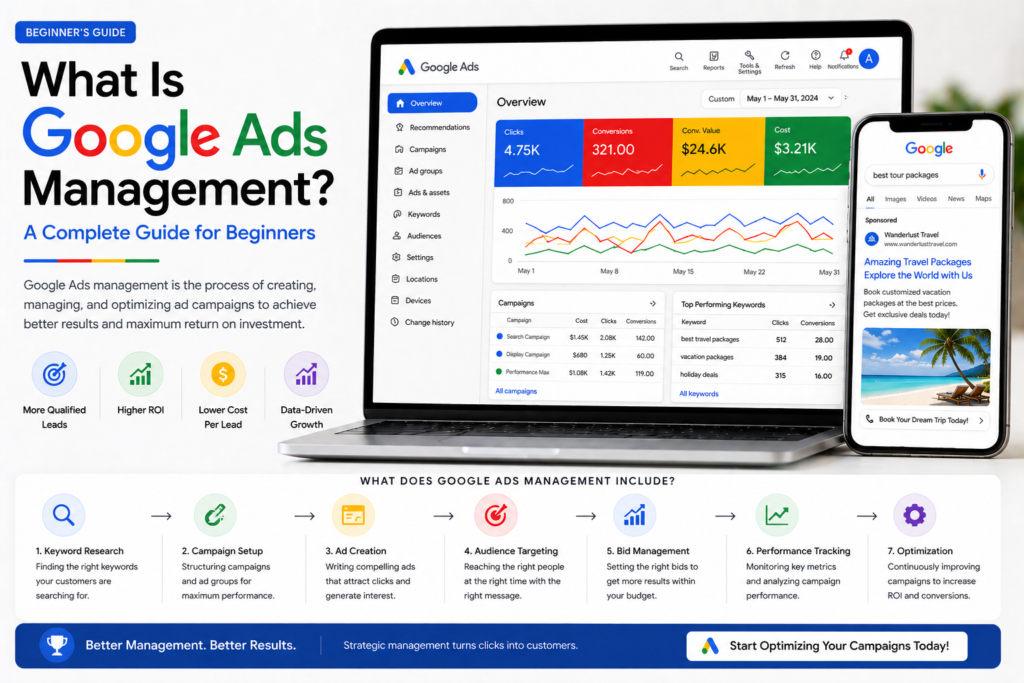
What Is Google Ads Management? A Complete Guide for Beginners 🎯
🎯 TL;DR Google Ads management is the ongoing process of setting up, monitoring, and optimising Google Ads campaigns to maximise return on ad spend. It includes keyword research, campaign structure, ad copywriting, bid management, landing page optimisation, and weekly performance analysis. Businesses either manage Google Ads themselves (best for small budgets under £1,000/month with time to learn) or hire a Google Ads manager or agency (recommended for budgets over £1,500/month where professional optimisation pays for itself). Poorly managed Google Ads campaigns waste 40–60% of budget on irrelevant clicks — good management eliminates that waste.
💡 Summary Google Ads is one of the most powerful lead generation tools available — but it’s also one of the easiest to waste money on. The difference between a profitable campaign and an expensive one almost always comes down to how well it’s managed. This guide explains exactly what Google Ads management involves, what good management looks like, how much it costs, and how to decide whether to do it yourself or hire help.
Google Ads can be one of the best investments a business makes — or one of the most expensive mistakes.
The difference almost always comes down to management.
A well-managed Google Ads campaign targets the right keywords, reaches the right audience, converts clicks into leads, and continuously improves over time. A poorly managed one burns through budget on irrelevant searches, sends traffic to the wrong pages, and delivers disappointing results that lead business owners to conclude “Google Ads doesn’t work for my business.”
It works. But it needs managing properly.
Google Ads management is the discipline that makes the difference — and understanding what it actually involves is the first step to getting it right. 👇
What Is Google Ads Management?
The short answer: Google Ads management is the ongoing process of creating, monitoring, and optimising Google Ads campaigns to ensure they reach the right audience, generate quality clicks, and convert those clicks into leads or sales as efficiently as possible.
It’s not a one-time setup job. Google Ads management is a continuous cycle of analysis and improvement — adjusting bids, refining keywords, testing ad copy, improving landing pages, and reallocating budget toward what works.
What Google Ads Management Includes
A complete Google Ads management process covers seven core areas:
1. Campaign Setup and Structure Building campaigns with the right structure — separate campaigns per product, service, or destination, with tightly themed ad groups containing closely related keywords. Poor structure is one of the most common causes of wasted spend.
2. Keyword Research and Selection Identifying the exact search terms your ideal customers use and organising them into the right match types (exact, phrase, broad). Includes building a negative keyword list to prevent ads showing for irrelevant searches.
3. Ad Copywriting Writing compelling headlines and descriptions that match search intent, communicate your key differentiators, and drive qualified clicks. For Responsive Search Ads, this means writing 15 headlines and 4 descriptions that cover keyword match, benefit, social proof, and CTA categories.
4. Bid Management Setting and adjusting bids to maximise results within budget — choosing between Manual CPC, Maximise Conversions, Target CPA, or Target ROAS bidding strategies based on campaign maturity and goals.
5. Conversion Tracking Setup Installing tracking codes to measure what happens after a click — form submissions, phone calls, purchases, and other valuable actions. Without conversion tracking, optimisation is guesswork.
6. Landing Page Alignment Ensuring the page a visitor lands on after clicking an ad is relevant, fast-loading, and conversion-optimised. Message match between ad and landing page is one of the biggest factors in campaign profitability.
7. Ongoing Optimisation Weekly tasks including Search Terms report review (adding negative keywords), bid adjustments by device and time, A/B testing ad copy, pausing underperformers, and reallocating budget toward highest-performing campaigns.
Why Google Ads Management Matters So Much
The short answer: Without active management, Google Ads campaigns accumulate wasted spend — irrelevant search terms triggering ads, underperforming keywords consuming budget, and missed optimisation opportunities. Studies consistently show poorly managed campaigns waste 40–60% of their budget.
The Wasted Spend Problem
When you run Google Ads without active management, several things happen automatically that cost you money:
Broad match keywords expand too far. A keyword like “travel agent” might trigger your ad for searches like “travel agent jobs”, “travel agent course”, “become a travel agent” — none of which are your customers. Without reviewing the Search Terms report weekly and adding negative keywords, you pay for every one of those clicks.
Underperforming ads keep running. Google will keep showing a low-quality ad indefinitely unless someone reviews performance and pauses it. A well-managed campaign identifies and replaces underperforming ad copy regularly.
Budgets get allocated to campaigns based on default settings rather than actual performance. Active budget management shifts spend toward what generates leads and away from what doesn’t.
Quality Score deteriorates without attention. Poor Quality Score means you pay more per click than competitors with better-managed accounts. Good management keeps Quality Scores high — reducing cost per click by 20–50% compared to unmanaged accounts.
The Compounding Improvement Effect
Well-managed Google Ads campaigns improve over time. Each week of data makes the next week’s optimisation more precise. Each negative keyword added reduces wasted spend permanently. Each landing page improvement increases conversion rate for all future traffic.
After 3–6 months of active management, a well-run campaign is typically generating 2–3× more leads for the same budget than it was in month one.
The Google Ads Management Process — Week by Week
The short answer: Professional Google Ads management follows a consistent weekly rhythm — reviewing Search Terms and adding negatives, checking conversion data by keyword and campaign, adjusting bids based on performance, testing new ad copy, and reviewing landing page conversion rates.
Week 1–4: Campaign Launch and Learning Phase
The first four weeks of a new campaign are the learning phase — Google’s algorithm is gathering data to understand which users, times, devices, and searches generate your desired outcomes.
Week 1 tasks:
- Final keyword list review and negative keyword setup
- Campaign and ad group structure confirmed
- Ad copy written and uploaded (minimum 2 RSAs per ad group)
- All ad extensions added (sitelinks, callouts, structured snippets, call)
- Conversion tracking verified and working
- Initial bids set (Manual CPC or Maximise Conversions)
Weeks 2–4 tasks:
- Daily budget pacing check (is the budget being spent efficiently?)
- Search Terms report review — add new negative keywords
- Initial Quality Score assessment
- Landing page conversion rate check
- First ad copy performance data review
Month 2–3: Optimisation Phase
Once the learning phase is complete and conversion data is accumulating, active optimisation begins.
Monthly tasks:
- Keyword performance review — pause keywords spending 3× target CPA with zero conversions
- Bid strategy transition (Maximise Conversions → Target CPA once 30+ monthly conversions)
- Ad copy A/B test results — replace Low-rated assets
- Device and time-of-day bid adjustments based on conversion data
- Audience layer review — are certain audiences converting better?
- Budget reallocation toward top-performing campaigns
Month 4+: Scaling Phase
With a profitable campaign established, management shifts toward scaling — getting more conversions at the same or lower cost per conversion.
Ongoing tasks:
- New keyword expansion (search terms report identifies new opportunities)
- New ad copy tests (fresh creative prevents ad fatigue)
- Seasonal bid adjustments
- Competitor analysis — are new competitors appearing?
- Landing page split tests to improve conversion rate
- Budget scaling on campaigns consistently hitting Target CPA
DIY Google Ads Management vs Hiring a Professional
The short answer: Managing Google Ads yourself makes sense for budgets under £1,000/month if you have time to learn and weekly time to manage — hiring a professional makes sense for budgets over £1,500/month where the cost of management is outweighed by the improvement in results.
DIY Google Ads Management
When it makes sense:
- Monthly ad spend under £1,000
- You have 3–5 hours per week to dedicate to learning and managing
- Your product or service is straightforward with clear keywords
- You’re willing to accept a learning curve and some initial wasted spend
What you need to learn:
- Campaign and ad group structure
- Keyword match types and negative keywords
- Responsive Search Ad copywriting
- Conversion tracking setup
- Basic bid strategies
- Search Terms report review
Resources to learn DIY management:
- Google Ads Help Centre (free, comprehensive)
- Google Skillshop — Google Ads certifications (free)
- Our guide on how to find keywords for Google Ads
- Our guide on Google Ads bidding strategies
- Our guide on Google Ads Quality Score
Hiring a Google Ads Manager or Agency
When it makes sense:
- Monthly ad spend over £1,500
- You don’t have time to learn and manage actively
- Previous campaigns have performed poorly despite effort
- You need fast results without a learning curve
- Your campaigns are complex (multiple products, locations, or audiences)
What to look for in a Google Ads manager:
- Google Ads certification (verifiable at skillshop.google.com)
- Experience in your specific industry
- Transparent reporting — you should see the actual account, not just a dashboard they control
- Clear fee structure — flat monthly retainer or percentage of spend
- Case studies with measurable results
What to avoid:
- Managers who won’t give you access to your own account
- Agencies charging setup fees without clear deliverables
- Anyone guaranteeing specific positions or click volumes
- Management fees that exceed 20–25% of your total ad spend
The Cost of Google Ads Management
| Management Type | Typical Cost | Best For |
|---|---|---|
| DIY (your time) | 3–5 hours/week | Budgets under £1,000/month |
| Freelance specialist | £300–£800/month | Budgets £1,000–£5,000/month |
| Boutique agency | £500–£1,500/month | Budgets £2,000–£10,000/month |
| Large agency | £1,500–£5,000+/month | Budgets £10,000+/month |
A good rule of thumb: management fees should not exceed 20–25% of your monthly ad spend. If you’re spending £1,000/month on ads, paying £800/month in management fees leaves very little room for the campaigns to be profitable.
Key Google Ads Management Metrics to Track
The short answer: The five most important Google Ads management metrics are Cost Per Conversion (what you pay per lead or sale), Conversion Rate (percentage of clicks that convert), Quality Score (Google’s rating of your ad relevance), Click-Through Rate (percentage of impressions that result in clicks), and Return on Ad Spend (revenue generated per pound spent on ads).
The Essential Metrics Dashboard
| Metric | What It Measures | Good Benchmark |
|---|---|---|
| Cost Per Conversion | What you pay per lead or sale | Depends on industry/offer |
| Conversion Rate | % of clicks that convert | 3–8% for lead gen |
| Quality Score | Google’s ad relevance rating | 7–10 is excellent |
| Click-Through Rate (CTR) | % of impressions that get clicked | 3–5% for search |
| Impression Share | % of eligible searches where your ad appeared | 60–80% target |
| Search Lost IS (Budget) | Impressions lost due to budget | Keep below 10% |
| Search Lost IS (Rank) | Impressions lost due to low Ad Rank | Keep below 20% |
| ROAS | Revenue per £1 of ad spend | Depends on margins |
The One Metric That Matters Most
For most businesses, Cost Per Conversion (also called Cost Per Acquisition or CPA) is the single most important metric. Everything else is in service of this number.
If you know your target CPA — the maximum you can pay per lead or sale while remaining profitable — everything in Google Ads management is oriented toward hitting that target consistently and then driving it lower over time.
Google Ads Management Tools
The short answer: The essential Google Ads management tools are Google Ads itself (the primary interface), Google Analytics 4 (for conversion data and audience insights), Google Search Console (for organic search data that informs keyword strategy), and Google’s free Keyword Planner (for keyword research and volume estimates).
Essential Free Tools
Google Ads Interface Your primary management tool. Everything from campaign setup to bid adjustments to performance reporting happens here. Learn to navigate the Campaigns, Ad Groups, Keywords, Ads & Assets, and Reports sections.
Google Analytics 4 Connected to your Google Ads account, GA4 shows what happens after someone clicks your ad — which pages they visit, how long they stay, and whether they complete your conversion goal. Essential for landing page optimisation decisions.
Google Search Console Shows which organic keywords bring visitors to your site — invaluable for identifying new paid keyword opportunities and understanding your overall search presence.
Google Keyword Planner Free within Google Ads — shows search volume estimates, competition levels, and suggested bid ranges for keywords. Your starting point for keyword research.
Useful Paid Tools
SEMrush or Ahrefs — competitor keyword analysis and PPC research Optmyzr — automated optimisation recommendations and bid management Google Looker Studio — custom reporting dashboards combining data from multiple sources Unbounce or Leadpages — dedicated landing page builders for improving conversion rates
Common Google Ads Management Mistakes ❌
1. Not setting up conversion tracking before launch Running campaigns without conversion tracking means you can’t measure results or optimise intelligently. Always set up conversion tracking before the first ad goes live.
2. Using only broad match keywords Broad match without Smart Bidding and sufficient conversion data causes ads to show for highly irrelevant searches. Start with phrase and exact match, add broad match cautiously once campaigns are established.
3. Never reviewing the Search Terms report The Search Terms report shows exactly what people typed when your ad appeared. Without weekly review, irrelevant searches accumulate and waste budget indefinitely.
4. Sending all traffic to the homepage The most expensive management mistake. Every ad group needs a dedicated, message-matched landing page. Homepage traffic converts at 1–2%; dedicated landing pages convert at 4–8%.
5. Changing too many things at once Each change resets the data you need to evaluate what worked. Make one change at a time, wait for sufficient data, then evaluate before changing something else.
6. Setting and forgetting Google Ads is not a set-and-forget channel. Without active weekly management, performance deteriorates as competitor landscapes change, Quality Scores drift, and budgets get misdirected.
7. Focusing on clicks instead of conversions Lots of cheap clicks that don’t convert is worse than fewer expensive clicks that do. Always optimise toward conversion data, not click volume.
Frequently Asked Questions
What is Google Ads management? Google Ads management is the ongoing process of setting up, monitoring, and optimising Google Ads campaigns to maximise performance. It includes keyword research, ad copywriting, bid management, conversion tracking, landing page optimisation, and regular performance analysis. Good Google Ads management reduces wasted spend, improves Quality Score, lowers cost per conversion, and scales results over time.
How much does Google Ads management cost? Google Ads management costs vary based on who manages the account. DIY management costs your time (3–5 hours per week). Freelance Google Ads specialists typically charge £300–£800/month. Boutique agencies charge £500–£1,500/month. Large agencies charge £1,500–£5,000+/month. A general rule: management fees should not exceed 20–25% of your monthly ad spend to remain cost-effective.
What does a Google Ads manager do? A Google Ads manager sets up campaign structure, conducts keyword research, writes ad copy, installs conversion tracking, manages bids, reviews the Search Terms report weekly, tests new ad variations, adjusts budgets based on performance, and provides regular performance reports. They’re responsible for ensuring your ad spend generates the maximum possible return.
Should I manage Google Ads myself or hire someone? Manage it yourself if your monthly budget is under £1,000 and you have 3–5 hours per week to learn and manage actively. Hire a professional if your budget is over £1,500/month, you don’t have time to manage it properly, or your campaigns have underperformed despite effort. The cost of professional management is typically recovered through improved performance within 1–3 months.
How long does it take to see results from Google Ads management? The first leads or sales from Google Ads can appear within 24–48 hours of launch. However, the first 2–4 weeks is the learning phase where performance is inconsistent. Well-managed campaigns typically reach stable, predictable performance by week 4–6. Significant improvement from professional management versus DIY typically becomes visible at the 60–90 day mark.
What is a Google Ads management fee? A Google Ads management fee is what you pay an agency or freelancer to manage your campaigns — separate from your actual ad spend (which goes directly to Google). Management fees cover strategy, setup, optimisation, reporting, and ongoing account management. Fee structures vary: flat monthly retainer (most common), percentage of ad spend (typically 10–20%), or performance-based (less common).
What is the difference between Google Ads and Google Ads management? Google Ads is the advertising platform — the system Google provides for running ads in search results. Google Ads management is the professional practice of operating that platform effectively — the strategy, setup, optimisation, and ongoing work required to make campaigns profitable. The platform is the tool; management is how you use the tool well.
How do I know if my Google Ads are being managed well? Signs of good Google Ads management: declining cost per conversion over time, Quality Scores of 7–10 on key keywords, Search Term reports showing relevant queries, conversion tracking accurately measuring leads, transparent regular reporting, and clear explanations for every change made. Warning signs: no access to your own account, rising costs with declining results, no Search Term reviews, and vague reporting that doesn’t show actual conversion data.
Final Thoughts
Google Ads management is what separates businesses that get exceptional ROI from Google Ads from those that waste budget and give up.
The platform itself is neutral — it will spend your budget regardless of whether your campaigns are well-structured or poorly built, well-targeted or broad, optimised weekly or ignored. The results you get are almost entirely determined by how the campaigns are managed.
Whether you manage your own campaigns or hire someone to do it, understanding what good management looks like — the weekly tasks, the key metrics, the optimisation decisions — puts you in a much stronger position to get results from your investment.
For more on running effective Google Ads campaigns, explore our complete Google Ads series: