

Google Analytics for Travel Agencies: How to Track What’s Actually Working 📊
🎯 TL;DR Google Analytics 4 (GA4) is the free tool that tells travel agencies exactly where their website visitors come from, which pages they visit, and — most importantly — which traffic sources are generating actual enquiries. Every travel agency running paid ads or publishing content should have GA4 installed, a conversion event set up for enquiry form submissions, and a weekly review routine checking the Acquisition and Conversions reports. Without this data, you’re spending marketing budget blind.
💡 Summary Most travel agencies either don’t have Google Analytics installed at all, or they have it installed but never look at it. Both situations mean making marketing decisions without data — spending money on channels that aren’t working, and underinvesting in ones that are. This guide shows travel agencies exactly how to set up GA4, what to track, which reports matter, and how to use the data to make better marketing decisions every week.
Here’s a question most travel agency owners can’t answer: which marketing channel generated your last 10 enquiries?
Was it Google Ads? Instagram? Organic search? A referral from a past customer? Direct traffic from someone who already knew your name?
If you can’t answer that question — you’re making marketing budget decisions based on guesswork. You might be spending £500/month on Google Ads while most of your enquiries are actually coming from Instagram. Or investing heavily in SEO while your paid campaigns are generating the best leads.
Google Analytics for travel agencies is the tool that answers these questions. It’s free, it’s built by Google, and when set up correctly it gives you complete visibility into what’s working, what isn’t, and where to focus your marketing investment.
This guide shows you exactly how to use it. 👇
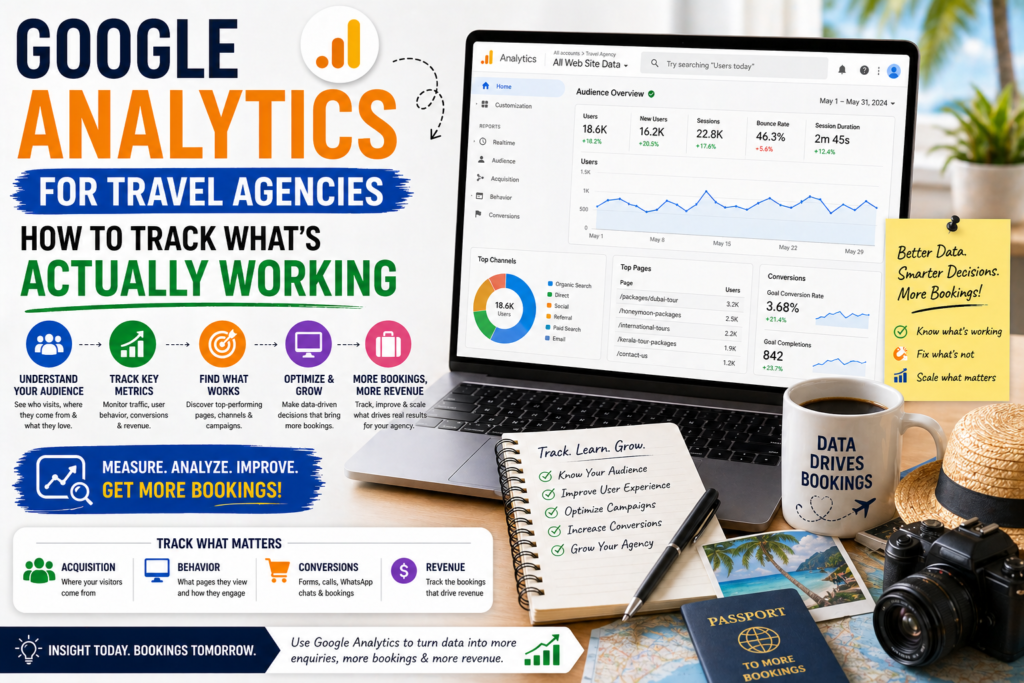
Why Google Analytics Matters for Travel Agencies
The short answer: Google Analytics tells you where your website visitors come from, what they do on your site, and which sources generate actual enquiries — giving you the data to invest your marketing budget in what works and stop spending on what doesn’t.
The Alternative — Marketing Blind
Without Google Analytics, you’re making decisions based on:
- Gut feeling (“I think Instagram is working well”)
- Vanity metrics (“We got 500 Instagram likes this month”)
- Incomplete data (“We got 12 enquiries this month but no idea where they came from”)
With Google Analytics properly set up, you know:
- Which channels generated each enquiry
- Which pages on your website convert visitors best
- Which destinations attract the most interest
- Where in the journey visitors are dropping off
- How long people spend on each page
- What devices your visitors use (mobile vs desktop)
It’s Free — There’s No Reason Not to Use It
Google Analytics 4 is completely free. It integrates with Google Ads, Google Search Console, and most email marketing platforms. There’s genuinely no reason for any travel agency running a website not to have it installed and configured.
Step 1 — Set Up Google Analytics 4 (GA4)
The short answer: GA4 is Google’s current analytics platform — it replaced Universal Analytics in 2023. If your site is using the old Universal Analytics (UA), you need to migrate to GA4 immediately as UA data is no longer being collected.
Creating Your GA4 Property
- Go to analytics.google.com
- Sign in with your Google account (use the same one as your Google Ads account)
- Click Admin (bottom left gear icon)
- Click Create → Property
- Enter your property name: “Tips For Digital Marketing” or your agency name
- Select your time zone and currency
- Select your industry: Travel
- Select business size
- Click Create
Installing GA4 on Your WordPress Website
The easiest method for WordPress is using the Site Kit by Google plugin:
- Go to
wp-admin → Plugins → Add New - Search:
Site Kit by Google - Install and Activate
- Follow the setup wizard — sign in with your Google account
- Connect your GA4 property
- Site Kit will automatically install the tracking code on every page
Alternative method — via Rank Math: Since you already have Rank Math Pro:
- Go to
Rank Math → General Settings → Analytics - Connect your Google account
- Select your GA4 property
- Save
This is already partially set up from when you connected Analytics earlier — verify it’s fully connected by checking if data is flowing in GA4.
Verify Installation
- Open your website in one browser tab
- Open GA4 in another tab
- Go to Reports → Realtime
- You should see yourself as an active user on your site
- If you see data — installation is confirmed ✅
Step 2 — Set Up Conversion Tracking
The short answer: The most important GA4 setup step for travel agencies is creating conversion events for enquiry form submissions — without this, you can see traffic data but not which sources are generating actual leads.
This is the step most agencies skip — and it’s the most valuable one.
What to Track as Conversions
For a travel agency, these are the actions that matter:
| Action | Why Track It |
|---|---|
| Enquiry form submission | Your primary lead generation action |
| Thank you page visit | Confirms form was submitted successfully |
| Phone number click | Customers calling directly from the site |
| WhatsApp button click | Customers starting a WhatsApp conversation |
| Lead magnet download | Email captured for nurture |
| Email address click | Direct email contact |
Setting Up a Thank You Page Conversion
The simplest and most reliable conversion tracking method:
- Create a dedicated Thank You page on your website (e.g.
/thank-you) - Configure your enquiry form to redirect to this URL after submission
- In GA4 go to Admin → Events → Create Event
- Name it:
enquiry_form_submission - Set the condition:
page_location contains /thank-you - Click Save
- Go to Admin → Conversions → Mark as Conversion for this event
Now every time someone submits your enquiry form and lands on the Thank You page, GA4 records it as a conversion.
Setting Up Phone Click Tracking
- In GA4 go to Admin → Events → Create Event
- Name it:
phone_click - Set condition:
event_name equals clickANDlink_url contains tel: - Mark as conversion
This tracks every time someone taps your phone number — invaluable for travel agencies where many customers prefer to call.
Step 3 — The 5 GA4 Reports Every Travel Agency Should Check Weekly
The short answer: Travel agencies need five reports — Acquisition Overview (where visitors come from), Landing Pages (which pages convert best), Conversions by Source (which channels generate enquiries), User Demographics (who your visitors are), and Search Console integration (which keywords bring organic visitors).
Report 1 — Acquisition Overview
Where to find it: Reports → Acquisition → Traffic Acquisition
What it shows: Where your website visitors are coming from — Google Ads, organic search, Instagram, Facebook, direct, email, referral.
What to look for:
- Which channels bring the most visitors?
- Which channels have the highest conversion rate? (Sessions that resulted in an enquiry)
- Which channels have high traffic but zero conversions? (Budget wastage)
Travel agency insight: You might discover that organic search brings 70% of your traffic but your paid campaigns bring 80% of your enquiries. Or that Instagram brings lots of visitors but almost none of them enquire. This data tells you exactly where to invest more — and where to stop spending.
Report 2 — Landing Pages Performance
Where to find it: Reports → Engagement → Landing Page
What it shows: Which pages visitors first land on when they arrive at your site, and how those pages perform.
What to look for:
- Which destination pages have the highest engagement (time on page, scroll depth)?
- Which landing pages have the highest conversion rate?
- Which pages have high bounce rates? (Visitors leaving immediately)
Travel agency insight: If your Maldives landing page has a 1% conversion rate while your Kenya safari page converts at 6%, the Maldives page needs work — better headline, more social proof, shorter form. This report tells you exactly where to focus your optimisation effort.
Report 3 — Conversions by Source
Where to find it: Reports → Acquisition → Traffic Acquisition → Add secondary dimension: Session default channel group
What it shows: Which specific traffic sources are generating your enquiries (conversion events).
What to look for:
- Cost per enquiry by channel (compare with your ad spend)
- Which organic keywords generate enquiries (requires Search Console connection)
- Which paid campaigns have the best conversion rate
Travel agency insight: This is your ROI dashboard. If Google Ads is generating enquiries at £45 each and Instagram organic is generating them at £0 (just your time), you have clear data to guide budget decisions.
Report 4 — User Demographics
Where to find it: Reports → User → User Attributes → Demographic Details
What it shows: Age, gender, location, and interests of your website visitors.
What to look for:
- Are your visitors in your target age group (25–55 for most travel agencies)?
- Which cities or countries are your visitors from?
- Do demographics align with your target customer profile?
Travel agency insight: If you’re based in Dubai but 60% of your website traffic is from the UK — your content is resonating with the UK market. Should you target UK customers more deliberately? Or do you need to create more UAE-focused content? Demographics data answers these questions.
Report 5 — Search Console Integration
Where to find it: Reports → Acquisition → Search Console → Queries
What it shows: The exact search terms people used to find your website on Google, how many impressions each term got, and how many clicks.
What to look for:
- Which keywords are you appearing for but not ranking highly? (Impressions but low clicks = opportunity)
- Which keywords generate the most traffic?
- Which queries are converting visitors into enquiries?
Travel agency insight: If you’re appearing on page 2 of Google for “Maldives honeymoon travel agent” (lots of impressions, few clicks), that post is close to page 1 — update it, improve internal linking to it, and push it onto page 1. Search Console in GA4 shows you exactly which posts are worth investing time in.
Step 4 — Setting Up Custom Reports for Travel Agencies
The short answer: GA4’s standard reports are useful but creating two custom reports — a Travel Leads Dashboard and a Content Performance Report — gives travel agencies a single view of the metrics that matter most without wading through irrelevant data every week.
Custom Report 1 — Travel Leads Dashboard
This report shows you your key lead generation metrics in one place.
- Go to Explore (in the left navigation)
- Click Blank to create a new exploration
- Name it: “Travel Leads Dashboard”
- Dimensions: Session source/medium, Landing page, Country
- Metrics: Sessions, Conversions, Conversion rate, Engaged sessions
- Filters: Conversion event = enquiry_form_submission
- Save
Now every week you open this report and immediately see which channels, pages, and countries are generating your travel enquiries.
Custom Report 2 — Content Performance Report
Shows you which blog posts and destination guides are driving the most engaged visitors.
- Go to Explore → Blank
- Name it: “Content Performance”
- Dimensions: Page title, Landing page
- Metrics: Sessions, Average engagement time, Scroll depth, Conversions
- Filters: Page path contains /blog/ or your blog URL structure
- Save
This tells you which content pieces are worth updating, promoting, and building links to.
Step 5 — Connecting GA4 with Your Other Marketing Tools
The short answer: GA4 works best when connected to Google Ads, Google Search Console, and your email marketing platform — these connections give you a complete picture of your marketing performance from first ad click to confirmed booking.
Google Ads Integration
- In GA4 go to Admin → Product Links → Google Ads Links
- Click Link and select your Google Ads account
- Enable auto-tagging in Google Ads (Settings → Account Settings → Auto-tagging → ON)
Once linked, you can see exactly which Google Ads campaigns, ad groups, and keywords are generating enquiries — not just clicks. This is the difference between knowing your ads are getting clicked and knowing they’re generating leads.
Google Search Console Integration
- In GA4 go to Admin → Product Links → Search Console Links
- Link your Search Console property
This pulls organic search query data into GA4 — you can see which keywords bring visitors from Google and whether those visitors convert into enquiries.
Email Marketing Integration (UTM Parameters)
For email campaigns, add UTM parameters to every link:
GA4 automatically reads these parameters and attributes the visit correctly. You’ll see “email” as a traffic source in your Acquisition report, making it easy to track which email campaigns drive website visits and enquiries.
Free UTM builder: Use Google’s Campaign URL Builder at ga-dev-tools.google/campaign-url-builder/
Step 6 — Your Weekly GA4 Review Routine
The short answer: A 10-minute weekly GA4 review — checking total enquiries, top-performing traffic sources, and any significant changes in traffic — is all most travel agencies need to make data-driven marketing decisions.
The 10-Minute Monday Morning Routine
1. Check total conversions this week vs last week (2 minutes) Reports → Conversions
- Are enquiries up or down week on week?
- If significantly down — what changed? (New campaign ended? SEO traffic dropped? Landing page issue?)
2. Check top traffic sources (3 minutes) Reports → Acquisition → Traffic Acquisition
- Which channels sent the most visitors?
- Which channels generated the most conversions?
- Any new or unexpected traffic sources?
3. Check top landing pages (3 minutes) Reports → Engagement → Landing Page
- Which pages are converting best?
- Any pages with high traffic but zero conversions? (Need optimisation)
4. Note any significant changes (2 minutes) Write down anything notable — a blog post getting unusual traffic, a new keyword appearing, a landing page conversion rate dropping. These are your action items for the week.
Understanding GA4 Metrics — Glossary for Travel Agencies
| Metric | What It Means | Why It Matters |
|---|---|---|
| Sessions | Number of visits to your site | Overall traffic volume |
| Users | Number of unique visitors | Reach of your content |
| Engaged Sessions | Visits where user spent 10+ seconds or had 2+ page views | Quality traffic indicator |
| Engagement Rate | % of sessions that were engaged | Content quality signal |
| Conversion Rate | % of sessions that resulted in an enquiry | Effectiveness of landing pages |
| Average Engagement Time | How long visitors spend on a page | Content relevance indicator |
| Bounce Rate | % leaving after one page without engaging | Page relevance/quality signal |
| New Users | First-time visitors | Audience growth |
| Returning Users | Repeat visitors | Brand loyalty/awareness |
Common GA4 Mistakes Travel Agencies Make ❌
1. Installing GA4 but never setting up conversion tracking Traffic data without conversion data tells you nothing useful about ROI. Set up enquiry form tracking before looking at any other reports.
2. Checking analytics daily and making decisions on small samples Daily fluctuations are normal and meaningless. Check weekly, make decisions monthly. One bad day doesn’t indicate a problem; consistent trends over weeks do.
3. Focusing on sessions instead of conversions 1,000 sessions with zero conversions is worse than 100 sessions with 10 conversions. Always filter your reports through the lens of conversions.
4. Not connecting Google Ads Without the GA4-Google Ads link, you can see that Google Ads sent traffic — but not which campaigns, keywords, or ads generated enquiries. Connect them.
5. Ignoring the Search Console queries report This report shows you exactly which keywords are close to ranking on page 1 — the highest-value, lowest-effort SEO opportunity available. Check it monthly at minimum.
6. Not using UTM parameters on email and social campaigns Without UTM parameters, traffic from your email newsletters shows up as “direct” in GA4 — making it impossible to measure email marketing performance accurately.
Frequently Asked Questions
What is Google Analytics 4 and how is it different from the old Google Analytics? Google Analytics 4 (GA4) is Google’s current analytics platform, replacing Universal Analytics (UA) which was retired in July 2023. GA4 uses an event-based data model (tracking specific user actions) rather than UA’s session-based model. It also has better cross-device tracking, stronger privacy compliance, and tighter integration with Google Ads. If you were using Universal Analytics before, you need to be using GA4 now — UA is no longer collecting data.
Is Google Analytics free for travel agencies? Yes — Google Analytics 4 is completely free to use with no limits on the number of websites or properties. There is a paid version called Google Analytics 360 for enterprise businesses, but the free version has everything a travel agency needs.
How do I know if Google Analytics is installed correctly on my travel agency website? Go to GA4 → Reports → Realtime and open your website in another tab. Within a few seconds you should see yourself as an active user in the Realtime report. If you see yourself listed, GA4 is installed correctly. If nothing appears after 30 seconds, the tracking code isn’t installed on that page.
What is the most important metric for a travel agency in Google Analytics? Conversion rate by traffic source — specifically, which channels are generating enquiry form submissions. This single metric tells you which marketing channels are actually generating leads and which are just generating traffic. Set up a conversion event for your enquiry form submissions before looking at any other metric.
How often should a travel agency check Google Analytics? Weekly is the right frequency for most travel agencies. Daily checks lead to over-reacting to normal fluctuations. Monthly checks are too infrequent to catch problems early. A 10-minute weekly review of conversions, traffic sources, and top landing pages gives you enough data to make good decisions without consuming too much time.
Can Google Analytics show me which Google keywords are generating travel enquiries? Yes — but you need to link Google Search Console to GA4 first. Once linked, go to Reports → Acquisition → Search Console → Queries to see which search terms bring organic visitors. To see which paid keywords generate enquiries, link Google Ads to GA4 and check the Google Ads reports with conversions as your primary metric.
What should I do if my Google Analytics shows a sudden drop in traffic? First, check if it’s a tracking issue (did the GA4 code get accidentally removed?). Test with the Realtime report. If tracking is fine, check Search Console for any manual actions or coverage issues. Check if a specific traffic source dropped (was it Google Ads that stopped? Organic? Social?). Check if a specific page lost traffic (did a key post drop in rankings?). Isolate the source of the drop before taking any action.
How do I track phone call enquiries in Google Analytics? Set up a click event for phone number links. In GA4 create a custom event that fires when someone clicks a link containing “tel:” (phone links use this format). Mark this event as a conversion. This tracks every tap on your phone number from mobile visitors. For tracking actual calls (not just clicks), consider a call tracking tool like CallRail which assigns unique numbers to each traffic source.
Final Thoughts
Google Analytics for travel agencies isn’t just a reporting tool — it’s the foundation of data-driven marketing decision-making. Without it, you’re guessing which channels generate leads. With it, you know.
Set up GA4 today if you haven’t already. Install the tracking code, set up your conversion events for enquiry form submissions, connect Google Ads and Search Console, and start your weekly 10-minute review routine.
Within 4–6 weeks you’ll have enough data to clearly see which marketing channels are generating your leads, which landing pages are converting, and where your biggest growth opportunities are.
That data is worth more than any amount of marketing budget spent without it.
For the complete travel agency digital marketing strategy, head back to our Complete Digital Marketing Guide for Travel Agencies. And to start improving the conversion rate of the pages GA4 shows are underperforming, read our guide on how to increase landing page conversion rate for travel agencies. 🌍
What is Google Analytics 4 and how is it different from the old Google Analytics?
Google Analytics 4 is Google’s current analytics platform, replacing Universal Analytics which was retired in July 2023. GA4 uses an event-based data model that tracks specific user actions rather than the session-based model used previously. It also offers better cross-device tracking, stronger privacy compliance, and tighter integration with Google Ads. If you were using Universal Analytics before, you need to be using GA4 now as it is no longer collecting data.
Is Google Analytics free for travel agencies?
Yes, Google Analytics 4 is completely free to use with no limits on the number of websites or properties you can track. There is a paid version called Google Analytics 360 designed for enterprise businesses, but the free version has everything a travel agency needs to track traffic, leads, and conversions effectively.
How do I know if Google Analytics is installed correctly on my travel agency website?
Go to GA4, then Reports, then Realtime, and open your website in another tab. Within a few seconds you should see yourself listed as an active user in the Realtime report. If you appear, GA4 is installed correctly. If nothing appears after 30 seconds the tracking code is not installed on that page and needs to be added.
What is the most important metric for a travel agency in Google Analytics?
The most important metric for a travel agency in Google Analytics is conversion rate by traffic source, specifically which channels are generating enquiry form submissions. This single metric tells you which marketing channels are actually generating leads and which are only generating traffic. Set up a conversion event for your enquiry form submissions before analysing any other metric.
How often should a travel agency check Google Analytics?
Weekly is the right frequency for most travel agencies to review Google Analytics. Daily checks lead to over-reacting to normal fluctuations. Monthly checks are too infrequent to catch problems early. A 10-minute weekly review of conversions, traffic sources, and top landing pages gives you enough data to make good decisions without consuming too much time.
Can Google Analytics show me which keywords are generating travel enquiries?
Yes, but you need to link Google Search Console to GA4 first. Once linked go to Reports, then Acquisition, then Search Console, then Queries to see which search terms bring organic visitors. To see which paid keywords generate enquiries, link Google Ads to GA4 and check the Google Ads reports with conversions set as your primary metric.
What should I do if Google Analytics shows a sudden drop in traffic?
First check if it is a tracking issue by testing the Realtime report to confirm the GA4 code is still installed. If tracking is fine, check Search Console for any manual actions or coverage issues. Then identify whether a specific traffic source dropped such as Google Ads, organic, or social. Finally check whether a specific page lost traffic. Always isolate the source of the drop before taking any action.
How do I track phone call enquiries in Google Analytics?
Set up a click event for phone number links in GA4 by creating a custom event that fires when someone clicks a link containing tel: which is the format used by phone links. Mark this event as a conversion to track every tap on your phone number from mobile visitors. For tracking actual calls rather than just clicks, consider a call tracking tool like CallRail which assigns unique numbers to each traffic source.